


Firefox doesn't render HTML on Netflix?

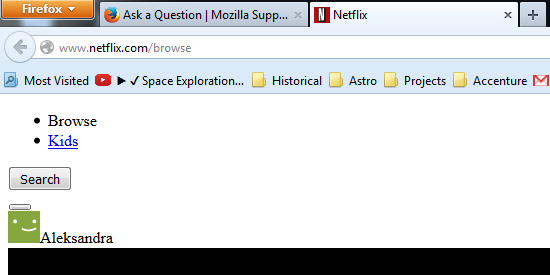
Since the update to FF 41, Netflix has stopped working on my computer - it just shows a bit of unstyled HTML. There are very few things that are clickable, but interestingly, anything that is not on www.netflix.com works fine - for example "Help Centre" on help.netflix.com is ok.
All other sites I visit work fine.
I've tried uploading screenshot, but your uploader doesn't seem to work - it's been spinning for 10 minutes for a 18Kb file. Happy to email the file to anybody interested.
I do have adblock plus and ghostery installed, but neither shows anything being blocked and disabling them doesn't make a difference.
All Replies (2)
Also, Netflix works fine on IE - as well as image upload - screenshot attached.
If you use extensions (Firefox menu button/Tools > Add-ons > Extensions) that can block content (e.g. Adblock Plus, NoScript, Flash Block, Ghostery) then make sure that such extensions aren't blocking content.
Start Firefox in Safe Mode to check if one of the extensions (Firefox menu button/Tools > Add-ons > Extensions) or if hardware acceleration is causing the problem.
- Switch to the DEFAULT theme: Firefox menu button/Tools > Add-ons > Appearance
- Do NOT click the Reset button on the Safe Mode start window
- https://support.mozilla.org/kb/Safe+Mode
- https://support.mozilla.org/kb/Troubleshooting+extensions+and+themes
You can try these steps in case of issues with web pages:
You can reload web page(s) and bypass the cache to refresh possibly outdated or corrupted files.
- Hold down the Shift key and left-click the Reload button
- Press "Ctrl + F5" or press "Ctrl + Shift + R" (Windows,Linux)
- Press "Command + Shift + R" (Mac)
Clear the cache and remove cookies only from websites that cause problems.
"Clear the Cache":
- Firefox/Tools > Options > Advanced > Network > Cached Web Content: "Clear Now"
"Remove Cookies" from sites causing problems:
- Firefox/Tools > Options > Privacy > "Use custom settings for history" > Cookies: "Show Cookies"
Start Firefox in Safe Mode to check if one of the extensions (Firefox menu button/Tools > Add-ons > Extensions) or if hardware acceleration is causing the problem.
- Switch to the DEFAULT theme: Firefox menu button/Tools > Add-ons > Appearance
- Do NOT click the Reset button on the Safe Mode start window