How to disable "Search with" in url bar in Firefox Developer Edition?

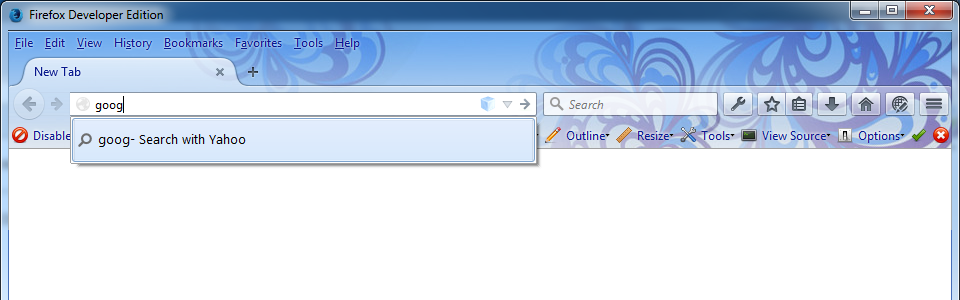
How to disable "Search with" in url bar in Firefox Developer Edition? Thank you
Modified by hamid_ss
Chosen solution
hi hamid, in order to change that enter about:config into the firefox address bar (confirm the info message in case it shows up) & search for the preference named browser.urlbar.unifiedcomplete. double-click it and change its value to false.
Read this answer in context 👍 34All Replies (3)
Chosen Solution
hi hamid, in order to change that enter about:config into the firefox address bar (confirm the info message in case it shows up) & search for the preference named browser.urlbar.unifiedcomplete. double-click it and change its value to false.
Thank you very much philipp! That definitely solved my problem.
This is now the default setting starting in Firefox 43, so I'll spell that out in a little more detail.
Basically, that item informs you what will happen if you press Enter or click the Go button, and makes it clearer where the "selection" is on the autocomplete drop-down if you display history/bookmark results there.
If you do not want this visual cue, it can be removed by disabling a preference, but this preference may have other important aspects that would also be disabled, so be on the lookout for unexpected changes in the bar's behavior and let us know if there are problems.
(1) In a new tab, type or paste about:config in the address bar and press Enter/Return. Click the button promising to be careful.
(2) In the search box above the list, type or paste URLB and pause while the list is filtered
(3) Double-click the browser.urlbar.unifiedcomplete preference to switch it from true to false