


Where did the "All Mail" folder go? How do I get it back?

Hi.
At some point the "all mail" folder for my Gmail account disappeared in Thunderbird. It still exists at Gmail.com (twice, actually). I'd hoped it would reappear when I installed T-bird on my new machine, but no such luck. Any idea where it may have gone and how I could get it back?
I've tried Account Settings / Synchronization & Storage / Message Synchronizing / Advanced, but it's not there on the list to be selected. (It is there for another Gmail account I use, but not for the one in question). I'm running Thunderbird 31.1.2 in Windows 8.1
Any suggestions you might have would be greatly appreciated.
Many thanks, Barb
Chosen solution
I can see from your other screenshots that you're indeed reaching the quota on the server.
When that happens, typically one would move messages off of the server to Local Folders. You created another Gmail account, and moved messages to the new account. That's possible, but it's not something I'd have done though.
When you're still at 95% storage usage on the server for the original account, the 'moved' messages still exist there. You therefore need to delete messages you have successfully 'moved' to the new account in the original account. You can do that either via Thunderbird or by logging in to your account via web browser. After deleting messages also make sure to empty the Trash.
You apparently created a mess with your Gmail labels, and I have no idea what you did and how you did that. From your screenshots it looks like there are labels on the server which are not visible in Thunderbird. Those are possibly the ones containing your mail, and that mail isn't visible in Thunderbird. Labels (including All Mail) do not disappear out of the blue, so there must be something you have done. Without anymore information what you did, I'm not sure how this can be fixed.
For the time being make yourself familiar with the Gmail label concept. https://support.google.com/mail/answer/77657?hl=en https://support.google.com/mail/answer/78755 https://support.google.com/mail/answer/78892
Read this answer in context 👍 1All Replies (13)

Why would you want the All Mail folder in the first place? It is redundant, and doubles the amount of mail you're downloading. https://support.google.com/mail/answer/82367?hl=en&ref_topic=3397500
Yes, exactly ... that's why I haven't minded it MIA.
But I need it because ... this is my work address and it's at 95% capacity. I made a new Gmail account, added it in T-Bird, selected every mail from 2010 at my work address and used right click to move them all to the new address. They all got there fine and dandy! But my original account is still 95% full. Apparently, they must be moved from "All Mail". (I could select all those mails and forward them to the new address from all mail at gmail.com, but then they are all from me with today's date.)
So I'm still searching ... can I get "All Mail" back in T-Bird?
Thanks in advance, Barb
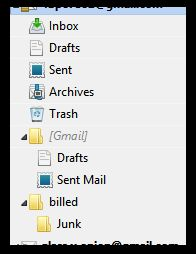
and ... Thanks, Christ1 for the support link. Funny, it says "Please note that you cannot remove the [Gmail] subfolders from your email client." Um, apparently you can ... lol, but don't ask me how I did it! I've attached a screenshot of the directory tree.
Modified by 4bporeo2
it's at 95% capacity
Where exactly does it say 'at 95% capacity'?
But my original account is still 95% full.
I don't see what 'All Mail' has got to do with this.
Apparently, they must be moved from "All Mail".
Certainly not. You can move messages from any folder. Apparently you still didn't grasp what 'All Mail' is about. Since this is strictly a Gmail thing, I'd suggest you consult the Gmail Help pages, or ask in a Gmail forum.
Instead of worrying about 'All Mail' I'd rather look into the '95% capacity' problem. I actually doubt you filled up the 25 GB message storage Gmail offers. So again, please explain where you see that the account is 95% full.
Funny, it says "Please note that you cannot remove the [Gmail] subfolders from your email client." Um, apparently you can ... lol, but don't ask me how I did it! I've attached a screenshot of the directory tree.
This states Removing not hiding them. If you log into your account at the gmail web page you will see that it is still there.
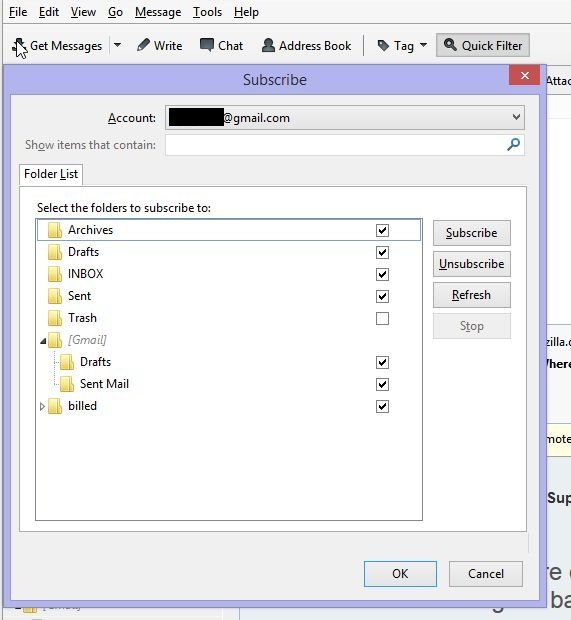
When using IMAP email with an email client like Thunderbird you subscribe to folders that you want to see and unsubscribe to folders that you do not want to see. My guess is that you are not subscribed to the All Mail folder. You do this under the File menu using the Subscribe function.
Christ1,
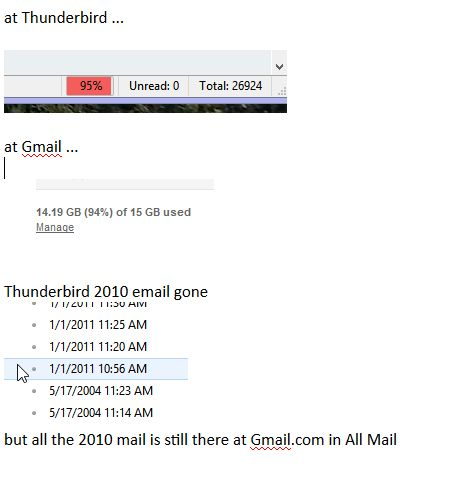
Thunderbird and Gmail both show it maxing out. I've attached a screen shot. I did move the mail out from archive using Thunderbird. It's gone from the archive folder and relocated to the new account with no issues there. But apparently since I didn't do it from the All Mail folder, it still exists in the All Mail folder, giving me still the 95% capacity. Screenshots attached...
I could go straight through Gmail, I guess, but I prefer using Tbird and hoped I could continue working with it.
Hi Airmail,
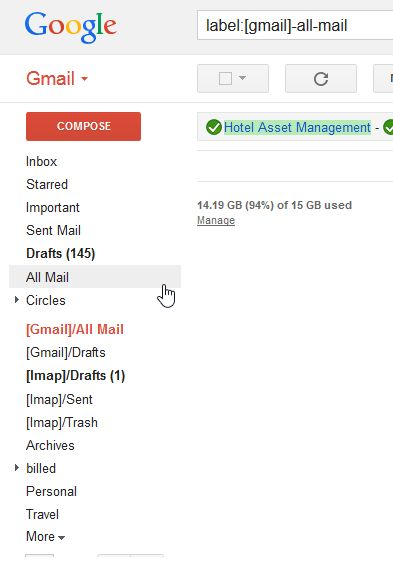
I don't have the folder available to subscribe to. I've attached 2 screen shots for you. Also, there's an earlier screen shot showing the directory tree in the main dashboard. Open to suggestions and happy to provide more info or check suggested settings, etc.
Thanks in advance, Barb
Modified by 4bporeo2
Thunderbird itself doesn't have a concept of 'account is full', there is no fixed limit. The storage is limited by the server though. What you see in your Thunderbird is most likely caused by an extension. Try to start Thunderbird in safe mode. https://support.mozilla.org/en-US/kb/safe-mode Do you still see the 95% warning?
Then login to your Gmail account via web browser. Your quota is shown there. How much storage are you using?
Chosen Solution
I can see from your other screenshots that you're indeed reaching the quota on the server.
When that happens, typically one would move messages off of the server to Local Folders. You created another Gmail account, and moved messages to the new account. That's possible, but it's not something I'd have done though.
When you're still at 95% storage usage on the server for the original account, the 'moved' messages still exist there. You therefore need to delete messages you have successfully 'moved' to the new account in the original account. You can do that either via Thunderbird or by logging in to your account via web browser. After deleting messages also make sure to empty the Trash.
You apparently created a mess with your Gmail labels, and I have no idea what you did and how you did that. From your screenshots it looks like there are labels on the server which are not visible in Thunderbird. Those are possibly the ones containing your mail, and that mail isn't visible in Thunderbird. Labels (including All Mail) do not disappear out of the blue, so there must be something you have done. Without anymore information what you did, I'm not sure how this can be fixed.
For the time being make yourself familiar with the Gmail label concept. https://support.google.com/mail/answer/77657?hl=en https://support.google.com/mail/answer/78755 https://support.google.com/mail/answer/78892
Thanks, Christ,1 for the links and helpful info. Indeed, I have no idea what I did to the folders and/or labels. Whatever it was happened years ago. As you said, All Mail is a redundant thing and I didn't mind it being missing at all. That is, until I tried moving mail from within TBird to free up space. It's only this account that's missing the All Mail folder. I have other Gmail accounts I manage with Tbird and they're fine. It's definitely user-caused, but I have no idea what I did ... how I got rid of it or how to get it back.
I tried moving the mail to local folders initially, but when my quota was still at 95% afterwards, I thought making a new address instead was the answer. Gmail.com is kind of a bear to work with and I'd hoped I could use TBird to find and delete the moved / missing mails. If I can't find the All Mail folder in Tbird, I'll have to approach it from Gmail directly. So be it!
Let me ask you ... do you think if I delete this account from TBird and then reinstall it that the TBird new account setup wizard would do, say, a reset on all the folder settings? Sounds like a nuisance but still less time consuming, I think, than manually tidying up a mass of old mail at Gmail.com.
Thanks in advance, Barb
I'd rather start with tidying things up on the server. I.e. delete messages you already moved to the new account or to Local Folders in the original account. And then also remove them from Trash. Google doesn't make it easy to really get rid of messages, and this may be a tidy process, but it will finally bring down the space used on the server.
UPDATE! Woo hoo! While exploring label settings at Gmail through the links you'd sent, I found I had unselected All Mail as something to display in IMAP. I checked the box and voila!, there's my All Mail folder back in TBird! Sweet! Moving and deleting within TBird is a snap ... love it! Back to it ...
Thanks, Christ1!
Best regards, Barb
Ok. I do not have Gmail. How do I recover the messages saved in Local Folders in Thunderbird? I had been saving messages for 5 years in folders set up for both personal and business messages sent or received. All of a sudden all my local folders are now empty and the saved messages are not visible.
if you dont have gmail why are you posting to an already closed thread that is about Gmail? Start a new thread with the details of your problem. Everyone that posted to this thread gets an email when it is posted to and most are not interested in your unrelated issue.