X
Tap here to go to the mobile version of the site.

Support Forum

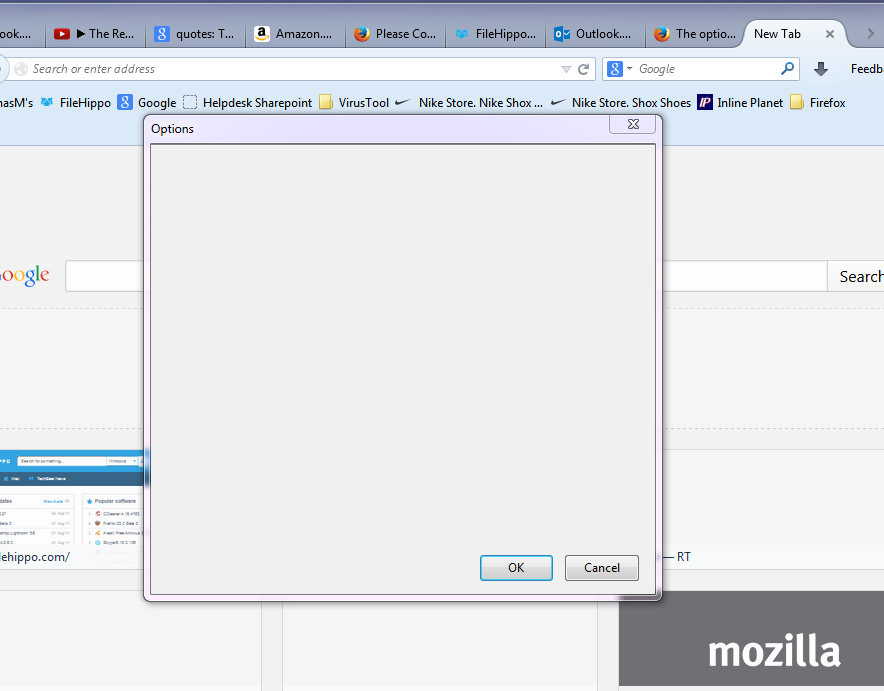
The options and clear history are blank.

Posted

Currently on 32 Beta 3 and these options have been blank since updating to version 32.0 Beta. Laptop is Win 7 64bit

Currently on 32 Beta 3 and these options have been blank since updating to version 32.0 Beta. Laptop is Win 7 64bit

Chosen solution

It's Ghostery. I disabled the add-ons 1 at a time and restarted the browser each time. I was able to repeat the issue multiple times with Ghostery.

Read this answer in context 6

Additional System Details

Installed Plug-ins

  • Shockwave Flash 14.0 d0
  • Google Update
  • 5.1.30514.0
  • Adobe PDF Plug-In For Firefox and Netscape 11.0.06
  • The plug-in allows you to open and edit files using Microsoft Office applications
  • Office Authorization plug-in for NPAPI browsers

Application

  • Firefox 32.0
  • User Agent: Mozilla/5.0 (Windows NT 6.1; WOW64; rv:32.0) Gecko/20100101 Firefox/32.0
  • Support URL: https://support.mozilla.org/1/firefox/32.0/WINNT/en-US/

Extensions

  • Adblock Plus 2.6.4 ({d10d0bf8-f5b5-c8b4-a8b2-2b9879e08c5d})
  • Add Bookmark Here ² 29.0.20140506 (abhere2@moztw.org)
  • Add-on Compatibility Reporter 2.0.4 (compatibility@addons.mozilla.org)
  • All-in-One Gestures 0.26 ({8b86149f-01fb-4842-9dd8-4d7eb02fd055})
  • Element Hiding Helper for Adblock Plus 1.3 (elemhidehelper@adblockplus.org)
  • Fasterfox Lite 3.9.9Lite (FasterFox_Lite@BigRedBrent)
  • Flashblock 1.5.17 ({3d7eb24f-2740-49df-8937-200b1cc08f8a})
  • Ghostery 5.3.2 (firefox@ghostery.com)
  • Netcraft Anti-Phishing Toolbar 1.9.2 ({0e10f3d7-07f6-4f12-97b9-9b27e07139a5})
  • Restartless Restart 9 (restartless.restart@erikvold.com)
  • Tamper Data 11.0.1 ({9c51bd27-6ed8-4000-a2bf-36cb95c0c947})
  • Test Pilot 1.2.3 (testpilot@labs.mozilla.com)
  • Troubleshooter 1.1a (troubleshooter@mozilla.org)

Javascript

  • incrementalGCEnabled: True

Graphics

  • adapterDescription: Mobile Intel(R) 4 Series Express Chipset Family
  • adapterDescription2:
  • adapterDeviceID: 0x2a42
  • adapterDeviceID2:
  • adapterDrivers: igdumd64 igd10umd64 igdumdx32 igd10umd32
  • adapterDrivers2:
  • adapterRAM: Unknown
  • adapterRAM2:
  • adapterVendorID: 0x8086
  • adapterVendorID2:
  • direct2DEnabled: True
  • directWriteEnabled: True
  • directWriteVersion: 6.2.9200.16492
  • driverDate: 10-4-2012
  • driverDate2:
  • driverVersion: 8.15.10.2869
  • driverVersion2:
  • info: {u'AzureCanvasBackend': u'direct2d', u'AzureFallbackCanvasBackend': u'cairo', u'AzureContentBackend': u'direct2d', u'AzureSkiaAccelerated': 0}
  • isGPU2Active: False
  • numAcceleratedWindows: 1
  • numTotalWindows: 1
  • webglRenderer: Google Inc. -- ANGLE (Mobile Intel(R) 4 Series Express Chipset Family Direct3D9Ex vs_3_0 ps_3_0)
  • windowLayerManagerRemote: False
  • windowLayerManagerType: Direct3D 10

Modified Preferences

  • accessibility.browsewithcaret: True
  • accessibility.typeaheadfind: True
  • accessibility.typeaheadfind.flashBar: 0
  • browser.cache.disk.capacity: 358400
  • browser.cache.disk.smart_size.enabled: False
  • browser.cache.disk.smart_size.first_run: False
  • browser.cache.disk.smart_size.use_old_max: False
  • browser.cache.disk.smart_size_cached_value: 358400
  • browser.cache.frecency_experiment: 3
  • browser.places.smartBookmarksVersion: 7
  • browser.sessionstore.upgradeBackup.latestBuildID: 20140731191115
  • browser.startup.homepage_override.buildID: 20140731191115
  • browser.startup.homepage_override.mstone: 32.0
  • dom.mozApps.used: True
  • extensions.lastAppVersion: 32.0
  • general.autoScroll: False
  • general.useragent.extra.xs: xs-gmAt9umEwkg;
  • gfx.direct3d.last_used_feature_level_idx: 1
  • javascript.options.strict: True
  • network.cookie.cookieBehavior: 1
  • network.cookie.lifetimePolicy: 1
  • network.cookie.prefsMigrated: True
  • network.http.max-persistent-connections-per-proxy: 12
  • network.http.max-persistent-connections-per-server: 12
  • network.http.pipelining: True
  • network.http.pipelining.maxrequests: 8
  • network.http.pipelining.ssl: True
  • network.http.proxy.pipelining: True
  • places.database.lastMaintenance: 1406988320
  • places.history.expiration.transient_current_max_pages: 103082
  • plugin.disable_full_page_plugin_for_types: application/pdf
  • plugin.importedState: True
  • privacy.clearOnShutdown.downloads: False
  • privacy.clearOnShutdown.history: False
  • privacy.donottrackheader.enabled: True
  • privacy.sanitize.migrateFx3Prefs: True
  • privacy.sanitize.sanitizeOnShutdown: True
  • privacy.sanitize.timeSpan: 0
  • storage.vacuum.last.index: 1
  • storage.vacuum.last.places.sqlite: 1406808951

Misc

  • User JS: Yes
  • Accessibility: No
iamjayakumars 475 solutions 5852 answers

Could you attach a screenshot?

Try to use JPG or PNG image file format and make it public view.

Could you attach a screenshot? *http://en.wikipedia.org/wiki/Screenshot *https://support.mozilla.org/kb/how-do-i-create-screenshot-my-problem Try to use JPG or PNG image file format and make it public view.

Helpful Reply

Here ya go.

Here ya go.
philipp
  • Top 10 Contributor
  • Moderator
2974 solutions 13817 answers

hello, can you try to replicate this behaviour when you launch firefox in safe mode once? if not, maybe an addon or hardware acceleration is interfering here...

Troubleshoot extensions, themes and hardware acceleration issues to solve common Firefox problems

hello, can you try to replicate this behaviour when you launch firefox in safe mode once? if not, maybe an addon or hardware acceleration is interfering here... [[Troubleshoot extensions, themes and hardware acceleration issues to solve common Firefox problems]]

Chosen Solution

It's Ghostery. I disabled the add-ons 1 at a time and restarted the browser each time. I was able to repeat the issue multiple times with Ghostery.

It's Ghostery. I disabled the add-ons 1 at a time and restarted the browser each time. I was able to repeat the issue multiple times with Ghostery.

Question owner

Even Aurora is broken.

Even Aurora is broken.