

This thread was archived.
Please ask a new question if you need help.

Solved
Archived
5/15/2014: I lost my bookmark manager

Hi, With the latest update, on Windows Vista, I now no longer have a Bookmark Manager or a History Window, which I miss. Is there a way I can get these things back?
I added a new bookmark folder in the "add bookmark" dialog, and I cannot find that folder anywhere in my bookmarks. But it is in the add bookmark dialog list at this time. I would like to be able to put this folder in my regular bookmarks menu, too.
TIA, Mark
Hi,
With the latest update, on Windows Vista, I now no longer have a Bookmark Manager or a History Window, which I miss. Is there a way I can get these things back?
I added a new bookmark folder in the "add bookmark" dialog, and I cannot find that folder anywhere in my bookmarks. But it is in the add bookmark dialog list at this time. I would like to be able to put this folder in my regular bookmarks menu, too.
TIA,
Mark
All Replies (2)
Chosen Solution
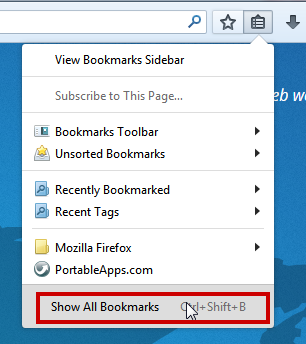
hello mark, you can get to your library by pressing "show all bookmarks" at the bottom of the bookmarks menu.
Thank you. I didn't know where that went. And I found where my lost folder went. Thanks again.