

This thread was archived.
Please ask a new question if you need help.

Archived
Thunderbird Email -- my read emails are disappearing--

I had a scammer in my email. I've since taken the computer to a 'fixer' guy --and they got the intruder out. BUT my read emails are disappearing after a short time. Is there some setting that automatically deletes them? how can I find it and change it??
Sally Smith
I had a scammer in my email. I've since taken the computer to a 'fixer' guy --and they got the intruder out. BUT my read emails are disappearing after a short time. Is there some setting that automatically deletes them? how can I find it and change it??
Sally Smith
All Replies (3)
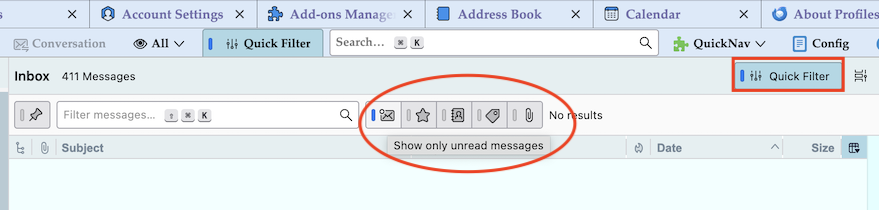
Verify if you have accidentally activated "Show only unread messages" in the the Quick Filter bar (see image)
thanks, I will look into that!! Sally
Also check you do not have an Account Setting that says to delete emails older than x number of days.
- 'Account Settings' > 'Synchronisation & Storage' under 'Disk Space' for the account.