


Thunderbird Email -- my read emails are disappearing--

I had a scammer in my email. I've since taken the computer to a 'fixer' guy --and they got the intruder out. BUT my read emails are disappearing after a short time. Is there some setting that automatically deletes them? how can I find it and change it??
Sally Smith
I had a scammer in my email. I've since taken the computer to a 'fixer' guy --and they got the intruder out. BUT my read emails are disappearing after a short time. Is there some setting that automatically deletes them? how can I find it and change it??
Sally Smith
All Replies (3)
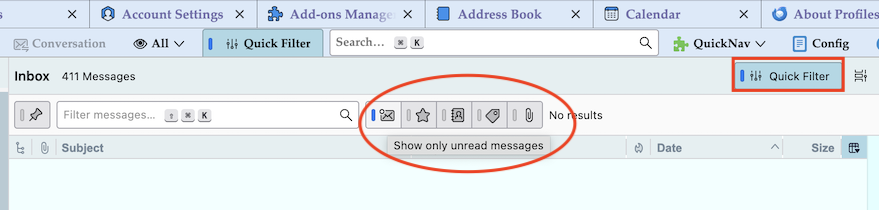
Verify if you have accidentally activated "Show only unread messages" in the the Quick Filter bar (see image)
Also check you do not have an Account Setting that says to delete emails older than x number of days.
- 'Account Settings' > 'Synchronisation & Storage' under 'Disk Space' for the account.