


Thunderbird displays the font larger on receipt

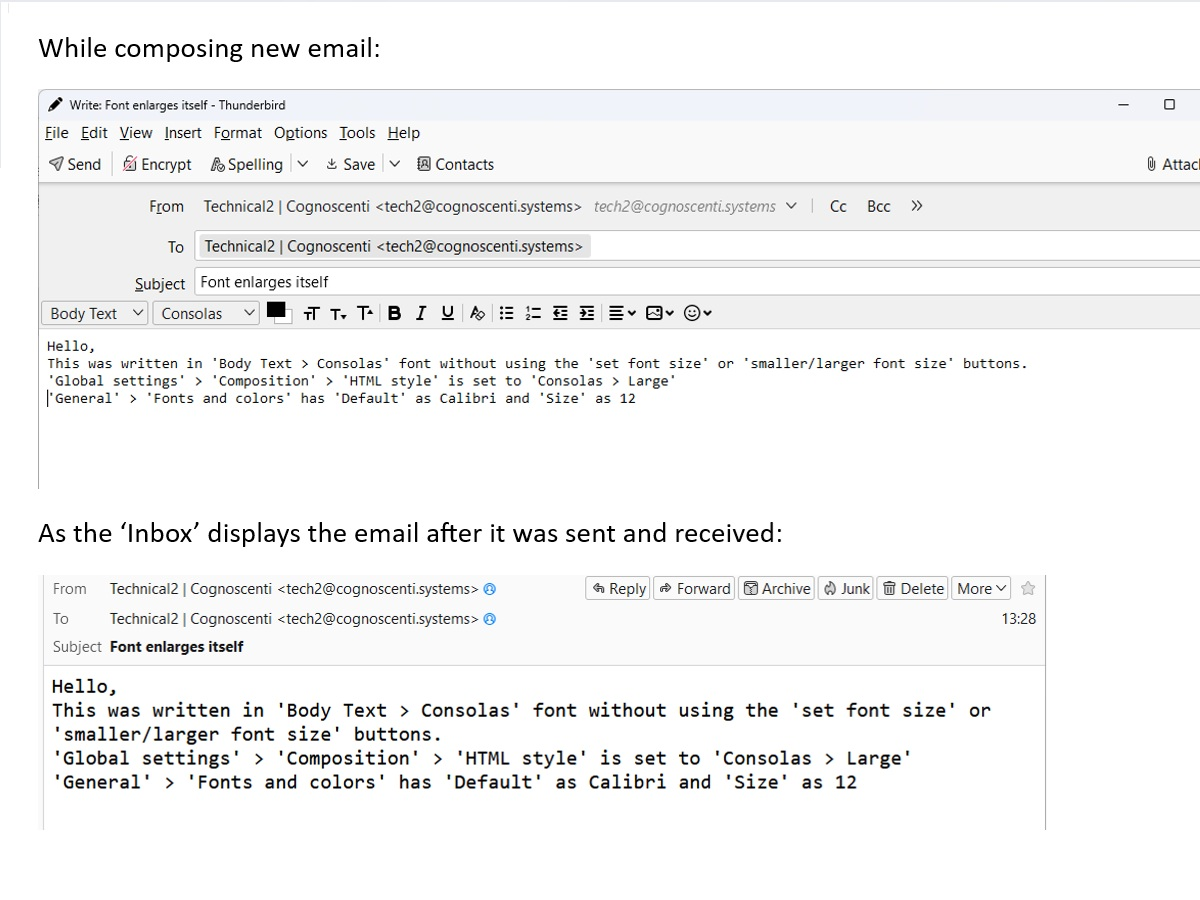
I write my email message in one font size and send the email to myself Thunderbird makes it bigger after receipt.
Please see the attached screenshots. Details about the settings used are in the screenshots. Thank you so much. Regards, Stephen Farndon
All Replies (3)
here are my thoughts. not a solution, just an observation. You have defaults at calibri/12 and composition default at Consolas/large. And on your example, you indicate that you overrode your default. So, it's difficult to assess the outcome. I suggest you installl an HTML addon so that you can see what your HTML looks like. My favorite is at https://betterbird.eu/addons/ Is your intent to send Consolas in large font whenever you write emails?
Thank you David. I will try that HTML add-on. It looks useful. My general problem is that it should be a case of what-you-see-is-what-you-get but Thunderbird is inconsistent. I just want the recipient to see the same as what I typed. I will report back with my findings...
Ok, if I may share a personal observation: most users want to display emails in their preferred font, not in yours. Receiving messages in Consolas/large may not be well-received by some, and others may have their email client set to show their font only. Ok, end of homily. :)
For consistency, I suggest setting the font as desired and then leave it alone. I verified this by changing my default to consolas/large and I had consistency in sent folder and in inbox. HTML isn't like a wordprocessor; it you do overrides throughout the message, you can lose the settings desired. Good luck.
Sidenote: if you real intent is for your viewing, thunderbird can be set so that you see consolas/large on messages and others see in their preferred font. That's a possibility.