


why is the first page on my email showing garbage?

The first page of my email shows up garbage. Why?
All Replies (4)
It is actuality most unlikely to actually be garbage, but as you do not provide a copy, no one can guess what it is you are calling garbage. It might be headers, it might be HTML code. It might be something else like a misconfigured signature.
Then there is context. You refer to a page, is this after you print it? So you get a sheet of paper with unknown information on it. Please take the time to state what you mean and keep in mind the person reading your post only knows what you tell them about your problem or computer setup.
Hello Matt. I have the same issue and it does seem to be the header information that is being printed. Is it possible to switch this off and see only the necessary e-mail info such as sender, recipients, time sent, subject, body, and signature? See attached example. Your help would be appreciated.
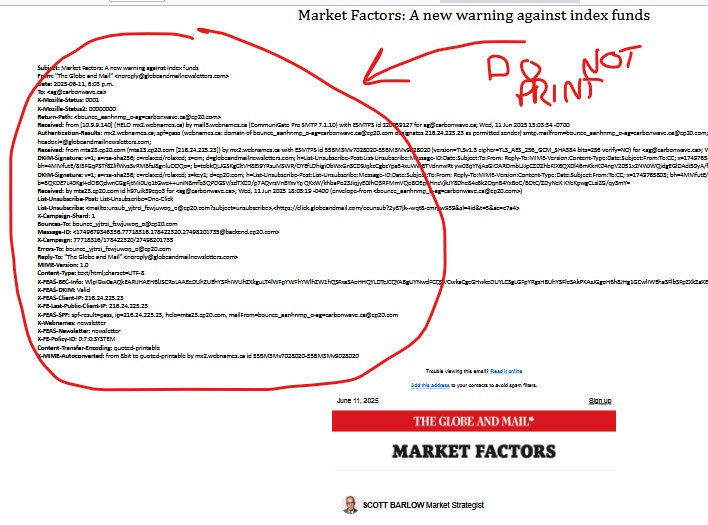
The following methods might be helpful:
Method 1: (In menu bar) "View" > "Headers" > Tick "Normal".
If you do not see menu bar, the following steps might be helpful: Right click on the bar where hamburger button (three horizontal bar icon on the top right corner) locates > Tick "Menu Bar".
Method 2: (On Message Pane) "More" > "Customize" > Untick "Show all headers" > "Done".
Modified by Yu5tiqX9og

Thanks for that. Problem solved.