


Resize inline images, place images side by side

I frequently copy images into my emails. When I do, they invariably end up very large. Other than grabbing the corners and dragging them smaller, is there an easy way to resize them? Is there an easy way to put images side-by-side rather than on top of each other?
All Replies (3)
Apparently, there's an add on that can resize the image - I don't use it so can't recommend it but it will be in the 'Add Ons and Themes' section.
Or you could manually resize the image in a graphics program before inserting them.
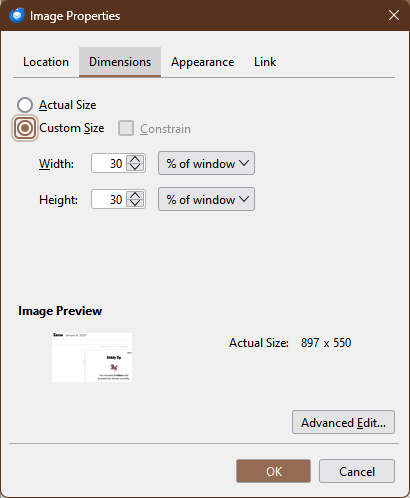
After inserting an image, double-click it to show the Image Properties dialog. On the Dimensions tab, select % of window and set it to something like 30% (see picture). If you paste another image, it will be side-by-side.
https://addons.thunderbird.net/en-US/thunderbird/addon/shrunked-image-resizer/versions/
Thank you. I'll give it a try.
This question has been locked because the original author has deleted their account. While you can no longer post new replies, the existing content remains available for reference.