


How can I switch off the "moving dots" on the tabs (causes queasiness, and migraine)?

The updated Firefox has 'moving dots' on the tabs. I need to remove them, quickly. How can I do this?
- My friend has eye convergence problems, and the animated dots will cause migraines.
- I have severe motion sickness, and am already queasy from the effects of the dots dotting-about.
The old rotating symbol was not an issue. This is. There was a similar post pointing out this issue, but I'm afraid the answer referred to 'css' and was above my level of computer knowledge. Can anyone help?
I don't want to move from Firefox but my body cannot cope with these animation effects, and my friend is in a considerably worse position. I'm hopeful there's a button press, somewhere, to shut it down.
Thank you.
All Replies (12)
Try setting toolkit.cosmeticAnimations.enabled = false in about:config

Separate Issue; Your System Details shows;
Installed Plug-ins
Shockwave Flash 12.0 r0
Shockwave Flash 27.0 r0
Having more than one version of a program may cause issues.
You must remove the older programs. Then get the current full installer.
Flash: Grab the uninstaller from here:
http://helpx.adobe.com/flash-player/kb/uninstall-flash-player-windows.html Uninstall Flash Player | Windows
http://helpx.adobe.com/flash-player/kb/uninstall-flash-player-mac-os.html Uninstall Flash Player | Mac
Then reinstall the latest version.
Note: Windows users should download the active_x for Internet Explorer. and the plugin for Plugin-based browsers (like Firefox).
Note: Windows 8 and Windows 10 have built-in flash players and Adobe will cause a conflict. Install the plugin only. Not the active_x.
Flash Player Version 27.0.0.183
https://get.adobe.com/flashplayer/ Direct link scans current system and browser Note: Other software is offered in the download. <Windows Only>
https://get.adobe.com/flashplayer/otherversions/ Step 1: Select Operating System Step 2: Select A Version (Firefox, Win IE . . . .) Note: Other software is offered in the download. <Windows Only>
See if there are updates for your graphics drivers https://support.mozilla.org/en-US/kb/upgrade-graphics-drivers-use-hardware-acceleration
It is not that difficult and you can still give it a try and create userChrome.css.
The first step is to open the "Help -> Troubleshooting Information" page and find the button to access the profile folder.
You can find this button under the "Application Basics" section as "Profile Folder -> Open Folder". If you click this button then you open the profile folder in the Windows File Explorer. You need to create a folder with the name chrome in this folder (name is all lowercase). In the chrome folder you need to create a text file with the name userChrome.css (name is case sensitive). In this userChrome.css text file you paste the text posted below.
In Windows saving the file is usually the only time things get more complicated because Windows can silently add a .txt file extension and you end up with a file named userChrome.css.txt. To avoid this you need to make sure to select "All files" in the dialog to save the file in the text editor using "Save File as".
@namespace url("http://www.mozilla.org/keymaster/gatekeeper/there.is.only.xul"); /* only needed once */

/* TABS - throbber */
.tab-throbber[busy]::before {
  background-image: url("chrome://global/skin/icons/loading.png") !important;
  animation: unset !important;
}
.tab-throbber[busy]:not([progress])::before {
  /* Grays the blue during "Connecting" state */
  filter: grayscale(100%);
}
Thank you for your answers: for the help you have given, and the time you took to reply. FredMcD, I shall follow your instructions about the Flash problem.
Most of this is beyond my current understanding, however (!) perhaps I'll get there, using your answers.
I'll print the instructions off, and use them with the google to try and understand what I'm doing.
- ***
If there's anyone who comes along and reads this, who has the ability to pass along information regarding the difficulties associated with these type of brain/eye/balance issues... up to the top of the Firefox tree, might you be kind enough to do so? There are likely to be a lot of people out there, dealing with the same issue, in the position of and having to 'like it or lump it'. There should be a simple non-technical method of removing sickness and migraine triggers from a web browser, which has actually designed them into its visual format.
The same goes for that proportion of the population who have difficulties translating graphical icons into the function/word they represent, yet there are fewer ways of replacing the pictures with 'word' menus, or 'word+picture' menus which can be more understandable, for those whose eye/brain systems work that way.
Style should always be secondary to function. And what is functional for many, is not necessarily functional for all. All that's needed, are simple on-screen menu options that can restore program function to those who aren't 'the many'.
Thank you.
@cor-el can you have multiple different css doing different effects in the same chrome.css file?
Modified by WestEnd
Why would having Flash create a horrible side-to-side blue button on your tabs as a page loads? Or are you saying that doing the about:config disable setting doesn't work if your browser is malfunctioning due to conflicts with plugins? That would make sense but is still pretty pathetic.
And WHY IN THE WORLD should someone have to go to all the trouble to create a special chrome.css file in order to turn off a horrible, paralyzingly irritating moving blue button on their browser, with a little trail on it to make sure you almost feel like your on a bad trip?!!!!! WHY IS IT THERE TO BEGIN WITH?
The chrome.css trick managed to disable my blue dot, but now I have the ever-swirling blue circle, even with the about:config feature disabled. WHY?!@!!!! Why do we need ANYTHING THERE? Is it because someone has decided that every television program (especially the news), every commercial, every show on Comedy Central (and its logo) and now every browser must have some sort of concentric circles, twisting spheres or tubes, jagged text, moving C's or blue dots or swirls to keep us in a constant state of hypnotic brain dementia so that we can no longer be sharp, independent individuals who think for themselves and are quick to point out media lies, government corruption and general bad information and get together to do something about it?
I mean, just look at the "I am not a robot" Captcha box!!!
I suppose I have to post a new question in order to figure out how to get rid of the stupid blue swirl. I love FireFox so much, but this type of secretive mind play combined with the fact that it is such a memory hog that it grinds to a near halt on most days AND now, it can't just say "unresponsive," but instead a truly unnecessarily bright yellow bar comes up and stops everything so that I can click a choice to stop the page, which has already been done, or to wait, which is what I was doing when the bar popped up!!! I guess someone out there wants me to find a new browser, but since I enjoy being in a constant state of misery and/or never-ending cycles of alpha waves, I just have to ask...
Does Firefox now come fluoridated?
Modified by Kira.

TyDraniu said
Try setting toolkit.cosmeticAnimations.enabled = false in about:config
"Try setting toolkit.cosmeticAnimations.enabled = false in about:config"
I tested that, it doesn't work.
I can't use Firefox 57+ until this is resolved, and I don't think the css trick is a resolution.
A CSS hack is the only way to change the way the loading throbber on tabs works in current Firefox releases.
- /questions/1176586 page load status symbol in each tab
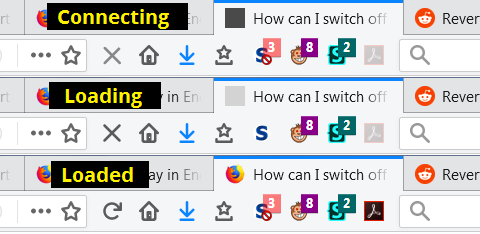
The "throbber", which is an icon that shows that Firefox is connecting and then that the page is loading, has been on the tab for a long time. The ping-ponging dots are more distracting than the old circling-arrow. However, if you do not even want the circling arrow, you can just have a patch of color in that space. But you do need to create a userChrome.css file to make this change.
/* Solid color tab throbber */
/* (A) Make it light gray while page is loading */
.tab-throbber[busy]::before {
  background-image: none !important;
  animation: unset !important;
  background-color: lightgray !important;
}
/* (B) Make it black while Firefox is connecting */
.tab-throbber[busy]:not([progress])::before {
  background-color: black !important;
}
Here's what that looks like:

If you like video demos, I have some "how to" videos on userChrome.css:
Ah, thank you!
Well, it worked the first time, but it doesn't work any more. In either Firefox 58 or Waterfox 56. Nothing works in Firefox 58, but that's another problem.
I don't know why userchrome works the first time, but not the next.
Okay, I've got Firefox working again, and the fix is working again in Firefox. Sorry about that.