


some websites load small banner insted of full window

Some windows are loading in a window at the top about 1/4 the size of the size it should be. my browser screen is fully expanded, most websites work but some still load this way and i have no idea why. Any help on this issue would be really appreciated.
All Replies (5)
Can you attach a screenshot?
- http://en.wikipedia.org/wiki/Screenshot
- https://support.mozilla.org/kb/how-do-i-create-screenshot-my-problem
Use a compressed image type like PNG or JPG to save the screenshot.
Can you resize those windows to make them larger?
You can check for problems caused by a corrupted localstore.rdf file.
See also:
This is what i get, also im getting green text on some sites.
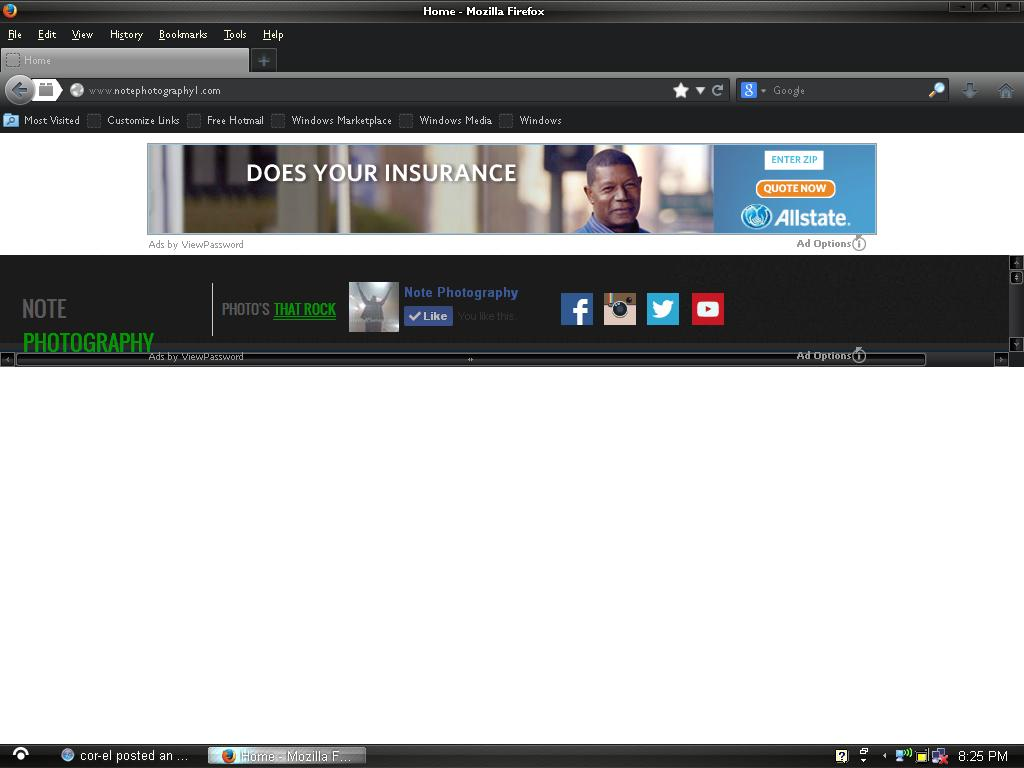
No dice with the two methods you listed =\
Start Firefox in Safe Mode to check if one of the extensions (Firefox/Tools > Add-ons > Extensions) or if hardware acceleration is causing the problem (switch to the DEFAULT theme: Firefox/Tools > Add-ons > Appearance).
- Do NOT click the Reset button on the Safe Mode start window.
- https://support.mozilla.org/kb/Safe+Mode
- https://support.mozilla.org/kb/Troubleshooting+extensions+and+themes
Do a malware check with several malware scanning programs on the Windows computer.
Please scan with all programs because each program detects different malware.
All these programs have free versions.
Make sure that you update each program to get the latest version of their databases before doing a scan.
- Malwarebytes' Anti-Malware:
http://www.malwarebytes.org/mbam.php - AdwCleaner:
http://www.bleepingcomputer.com/download/adwcleaner/
http://www.softpedia.com/get/Antivirus/Removal-Tools/AdwCleaner.shtml - SuperAntispyware:
http://www.superantispyware.com/ - Microsoft Safety Scanner:
http://www.microsoft.com/security/scanner/en-us/default.aspx - Windows Defender:
http://windows.microsoft.com/en-us/windows/using-defender - Spybot Search & Destroy:
http://www.safer-networking.org/en/index.html - Kasperky Free Security Scan:
http://www.kaspersky.com/security-scan
You can also do a check for a rootkit infection with TDSSKiller.
- Anti-rootkit utility TDSSKiller:
http://support.kaspersky.com/5350?el=88446
See also:
- "Spyware on Windows": http://kb.mozillazine.org/Popups_not_blocked
$ ping notephotographyl.com ping: cannot resolve notephotographyl.com: Unknown host Is that the right url?