


...firefix guys we have to talk my install it button went byebye

I don't know where to look it just went away!! Firefox guys, why are all my search suggestions "cute girl blow job?!!?!?!?! See the picture!
I wanted hearts but since I didn't get any I got you this to watch on youtube!! http://www.youtube.com/watch?v=5bcSoJZbs3o
Happy Valentines Day!!! <3 <3 <3 <3
Bella
Chosen solution
Tyler, I pulled the drive and had it gone over by a professional in a sandboxed machine. Result; no virus, no trojan, no malware. I do not run my computers on a network in a conventional manner and it is practically always disconnected from a network adapter. I am the only user of my equipment, and I happen to know who is doing what with them at all times since it would be myself using said devices, but I said that already didn't I? It would be a mistake to minimize an unknown persons efforts and knowledge in an instant simply because they are not sitting at a computer providing most likely answers to a very common scenario.
Google instant searches get polluted, that's all the problem is. I suggest anyone wanting further insight on the topic, read something along these lines: My big link to a google instant search explanation!
'Nuff said on that topic, no harm no foul! Okay!
Oh, PE stands for 'Portable Executable', one concept that helped windows become the dominate operating system of it's time.
Now, I have the firefox 27 installed. I ran the installer when it appeared the second time. It is working very well and I thank you bunches! If you've gone over my crash report dumps (I have no idea if you even have access to those, but I have sent in plenty) you're aware that the previous iteration of firefox was, well, pretty crashy on this configuration. The operating system has had numerous patches & stuff applied since I posted here last, along with the new firefox. I suppose all is well that ends well.
My gracious thanks to everyone on the firefox team and Happy Easter!!
Sincerely, Bella
Read this answer in context 👍 1All Replies (6)
Here's the picture. It's a big one!!! ;-)
ok finally...
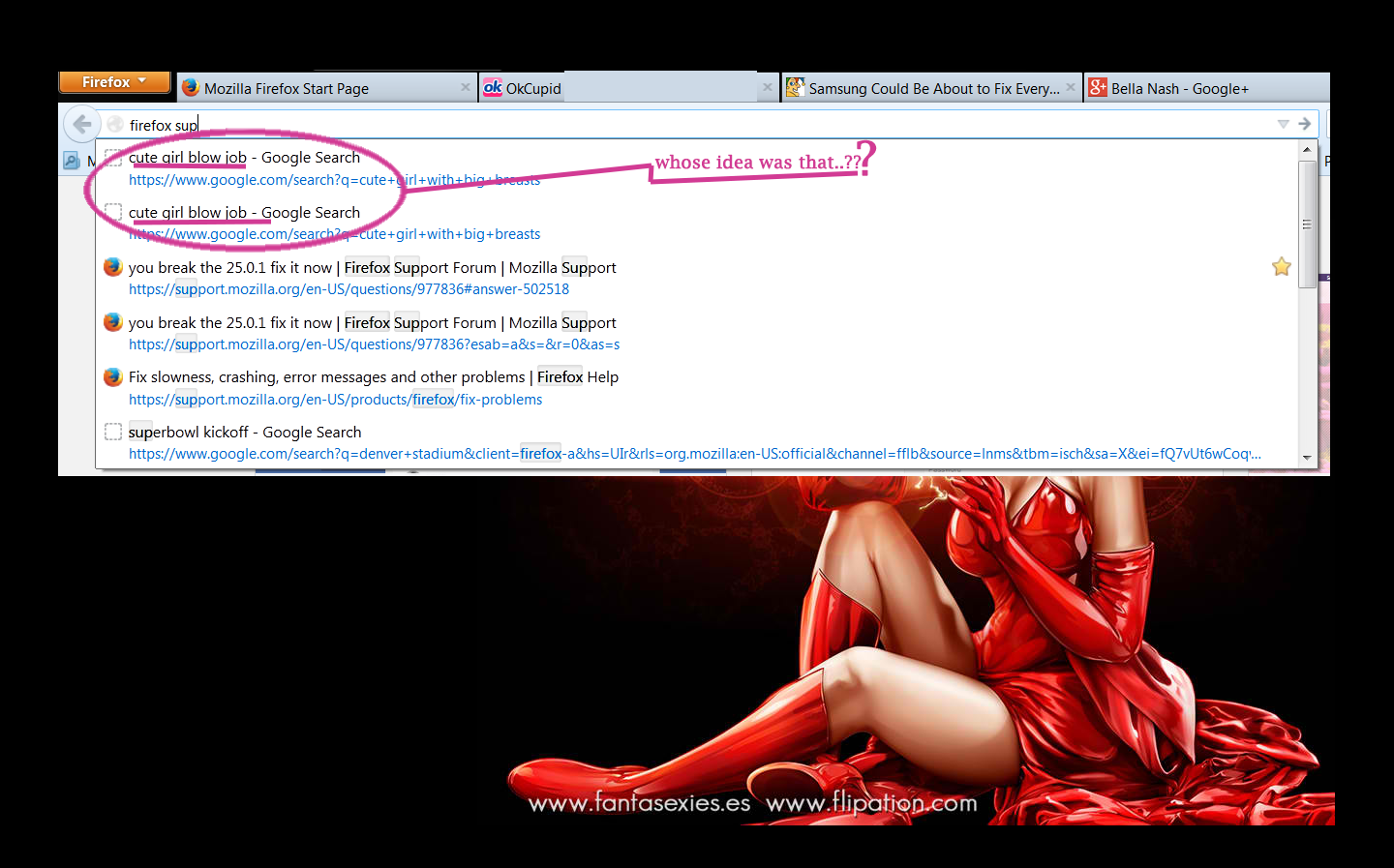
Is it possible that someone else has used that computer to do such a search?
Does that entry stay away if you highlight it with cursor Down and press the Delete key?
If not then you may have to delete the places.sqlite file in the Firefox profile folder.
- http://kb.mozillazine.org/Bookmarks_history_and_toolbar_buttons_not_working_-_Firefox
- https://support.mozilla.org/kb/Bookmarks+not+saved#w_fix-the-bookmarks-file
Start Firefox in Safe Mode to check if one of the extensions (Firefox/Tools > Add-ons > Extensions) or if hardware acceleration is causing the problem (switch to the DEFAULT theme: Firefox/Tools > Add-ons > Appearance).
- Do NOT click the Reset button on the Safe Mode start window.
- https://support.mozilla.org/kb/Safe+Mode
- https://support.mozilla.org/kb/Troubleshooting+extensions+and+themes
Do a malware check with some malware scanning programs on the Windows computer.
Please scan with all programs because each program detects different malware.
All these programs have free versions.
Make sure that you update each program to get the latest version of their databases before doing a scan.
- Malwarebytes' Anti-Malware:
http://www.malwarebytes.org/mbam.php - AdwCleaner:
http://www.bleepingcomputer.com/download/adwcleaner/
http://www.softpedia.com/get/Antivirus/Removal-Tools/AdwCleaner.shtml - SuperAntispyware:
http://www.superantispyware.com/ - Microsoft Safety Scanner:
http://www.microsoft.com/security/scanner/en-us/default.aspx - Windows Defender: Home Page:
http://www.microsoft.com/windows/products/winfamily/defender/default.mspx - Spybot Search & Destroy:
http://www.safer-networking.org/en/index.html - Kasperky Free Security Scan:
http://www.kaspersky.com/security-scan
You can also do a check for a rootkit infection with TDSSKiller.
- Anti-rootkit utility TDSSKiller:
http://support.kaspersky.com/5350?el=88446
See also:
- "Spyware on Windows": http://kb.mozillazine.org/Popups_not_blocked
Ok answers coming up.
NO ONE but myself has ever touched my computers. I am confident there is no malware/virus/trojan/anyotherthing on this computer.
That search for "cute girl blow job" has never been performed by anyone using this computer!
THIS COMPUTER HAS NEVER BEEN ROOTED!!
How do I know all of this to be true? Because it is my personal computer and I take pride of knowing how to maintain it. My problem is not the google instant or mozilla/firefox instant search suggestions, as is the disappearing - now get this!
>"INSTALL" button for v. 27 firefox, window that was in my face for 1/3 of a second. If that DID NOT come from the auto-update packaged with firefox I will crush, burn, grind, melt, smelt, re-crush, drill full of holes, and destroy the computers molecules in acids and post the video of me dancing on top of it to the youtube!
1.) Did firefox/mozilla; et al, send a v.27 update to my computer over the internet, or not?
That's the first question to answer. If affirmative, the answer doesn't matter. I want the new version!!
2.) The second question, is why was the INSTALLER programmed to destroy it's window so quickly? But, as above, I do not care and it doesn't matter, that problem is not pertinent to the issue at hand. The installer time out will be fixed since the FF team is aware of it, in due time of course.
3.) The third questions is, where is the downloaded PE for the upgrade supposed to be stored and what is it's file name?
I believe that should clear everything up, don't you? :D I am not bitching at you my intent is only to be emphatic, expressive and above all to exude clarity! And I have to go p! ;-)
Thank you very very very much for your attention and for helping with this, it is appreciated!!
Bella
Modified by Bella Nash
27.0.1 is the most recent version of Firefox.
If you have searches in your url bar, someone did them on your computer or you have a virus.
What's a PE?
Chosen Solution
Tyler, I pulled the drive and had it gone over by a professional in a sandboxed machine. Result; no virus, no trojan, no malware. I do not run my computers on a network in a conventional manner and it is practically always disconnected from a network adapter. I am the only user of my equipment, and I happen to know who is doing what with them at all times since it would be myself using said devices, but I said that already didn't I? It would be a mistake to minimize an unknown persons efforts and knowledge in an instant simply because they are not sitting at a computer providing most likely answers to a very common scenario.
Google instant searches get polluted, that's all the problem is. I suggest anyone wanting further insight on the topic, read something along these lines: My big link to a google instant search explanation!
'Nuff said on that topic, no harm no foul! Okay!
Oh, PE stands for 'Portable Executable', one concept that helped windows become the dominate operating system of it's time.
Now, I have the firefox 27 installed. I ran the installer when it appeared the second time. It is working very well and I thank you bunches! If you've gone over my crash report dumps (I have no idea if you even have access to those, but I have sent in plenty) you're aware that the previous iteration of firefox was, well, pretty crashy on this configuration. The operating system has had numerous patches & stuff applied since I posted here last, along with the new firefox. I suppose all is well that ends well.
My gracious thanks to everyone on the firefox team and Happy Easter!!
Sincerely, Bella