


File firefox_RASAPI32.log increase everyday

File firefox_RASAPI32.log increase everyday (C:\Windows\tracing\firefox_RASAPI32.LOG). Now it is 697 megabytes. How i can stop this?
Chosen solution
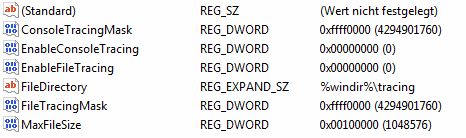
ok sorry, for your OS the path where these settings are determined might be HKEY_LOCAL_MACHINE\SOFTWARE\Microsoft\Tracing\firefox_RASAPI32
if the "enable"-preferences are set to 1 you might want to turn them to 0. i've attached a screenshot on how it looks for me without having done modifications.
Read this answer in context 👍 1All Replies (4)
hello, disable the logging: http://support.microsoft.com/kb/161426/en
How i can to do it Windows 7 not have HKEY_LOCAL_MACHINE\SYSTEM\CurrentControlSet\Services\Tracing
Chosen Solution
ok sorry, for your OS the path where these settings are determined might be HKEY_LOCAL_MACHINE\SOFTWARE\Microsoft\Tracing\firefox_RASAPI32
if the "enable"-preferences are set to 1 you might want to turn them to 0. i've attached a screenshot on how it looks for me without having done modifications.
Thank you change EnableFileTracing=1 to 0 and delete firefox_RASAPI32.LOG.