


not receiving ubuntu desktop thunderbird yahoo emails since July 2026 esr update

not receiving ubuntu desktop thunderbird yahoo emails since July 2026 esr update
All Replies (8)

Please explain in detail
- what you're doing,
- what happens,
- what you expect to happen.
Is there any error message?
I was using 140esr applications Firefox & Thunderbird and doing a normal esr update that ended with a Thunderbird error crash report that would not clear. So I reinstalled my Ubuntu Desktop image which removed the Thunderbird error. However, now I have 153(not esr) applications and Thunderbird will not setup or download the Yahoo emails. Please explain how to switch this system over to ESR if that is the problem. ...... (Please Note: I have a 2nd Ubuntu Desktop laptop computer with 140esr applications Firefox & Thunderbird that I DID NOT UPDATE and it is still working just fine receiving Yahoo emails.)
Modified by genardini
now I have 153(not esr) applications and Thunderbird will not setup or download the Yahoo emails.
Can you explain in more detail what that means?
Is there any error message?
What are you doing to trigger that error?
Please post a screenshot of the error. https://support.mozilla.org/kb/how-do-i-create-screenshot-my-problem
I was running the required esr update July 2026, but it crashed and hung my system. To erase crashed esr system I had to reboot my original image and waiting for all updates to finish. After restoring my operating system I now have 153 (not esr) applications and Thunderbird will not download my Yahoo emails. My questions is why is my system software is not esr after rebooting and updating. Both Firefox and Thunderbird were older esr versions, but are now are newest 153 versions with no esr.
I have attached screenshots for Firefox & Thunderbird versions before and after this crash issue.
Questions:
1). How to change my operating system back to esr like before the update crashed (hung) my system so I can again download Yahoo emails. 2). If esr is not the problem, then what versions of Thunderbird (and or Firefox) will allow me to obtain my Yahoo emails by downloading with Thunderbird?
Thank you for your helpful answers.
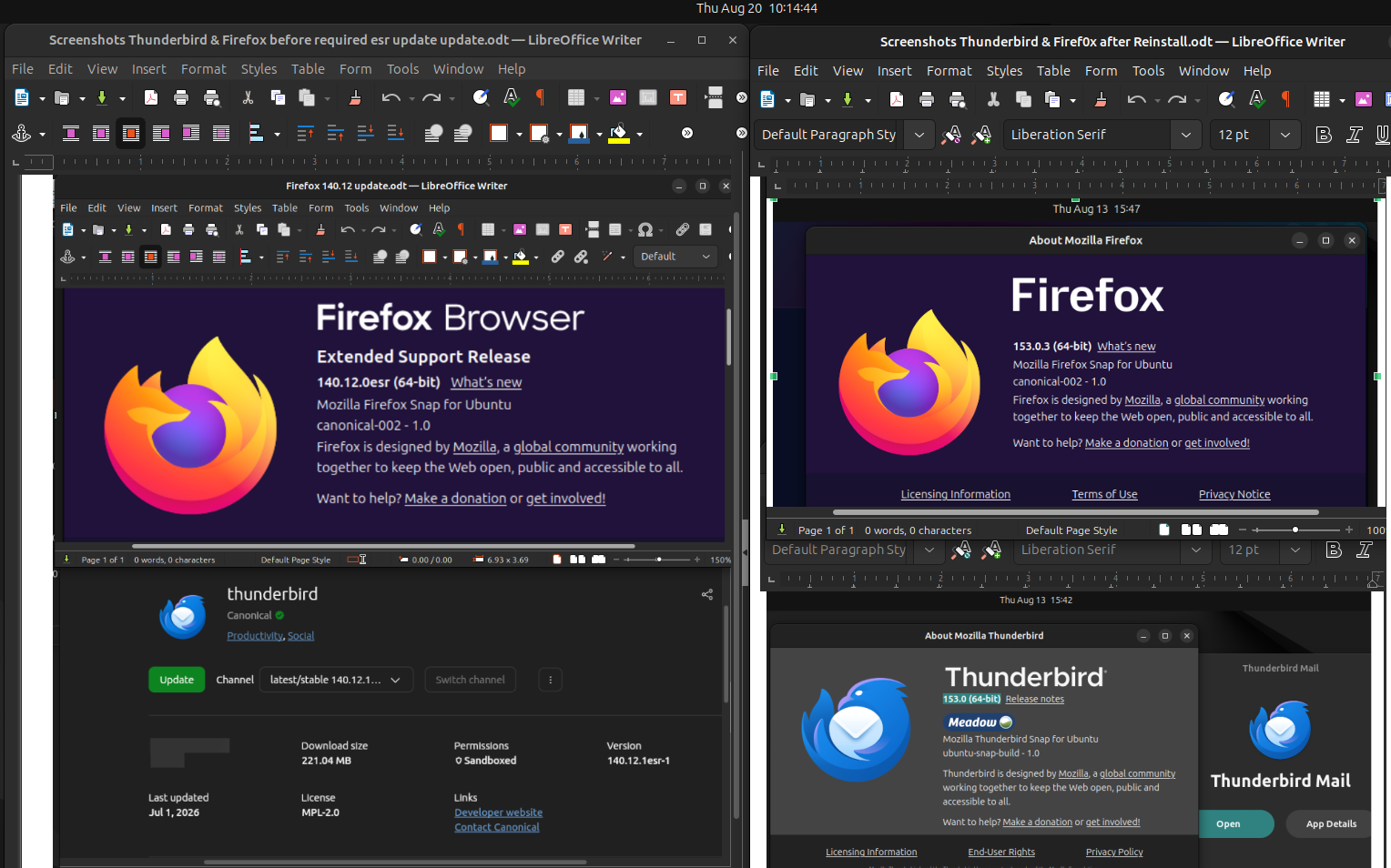
Modified by christ1
To erase crashed esr system I had to reboot my original image and waiting for all updates to finish.
If that means you re-installed the OS to fix a botched Thunderbird update, then this sounds like overkill. But I'm not going to speculate.
My questions is why is my system software is not esr after rebooting and updating.
As per your screenshots it looks like you are using Thunderbird packages provided by your distribution. Again, it's unclear what exactly you did and why, however, presumably you installed the non-ESR Thunderbird packages in the process of updating.
It doesn't really matter though, the Thunderbird release version is perfectly capable of getting your mail from a Yahoo account. Unfortunately you did neither respond to the questions asked, nor provided any screenshot of an error message. Without that we won't make any progress.
Well the the older version of Thunderbird I was using to access Yahoo emails was automatically updated in September to a new version so I can no longer use it for Yahoo mails.
So are there any options for Ubuntu Desktop email applications that will work with Yahoo? It looks like Yahoo now has their own email applications which are not free and that is their fix for email problems.

As christ1 mentions, Thunderbird DOES work with Yahoo. I'm using it right now - Thunderbird 154.0, Ubuntu 26.04. I notice that the Ubuntu App Center is now offering me Thunderbird 155.0, which is interesting because I haven't seen it offered anywhere else yet, and Ubuntu isn't usually the first to offer new versions. I'm not going to update yet, one reason being that one of my add-ons may not be compatible.
I suggest you make a safety copy of your Profile, then uninstall Thunderbird and reinstall.
By the way, warnings about the change between Release and ESR channels had been popping up regularly for months when I started Thunderbird. The process to change one to the other is described here:
"ANNOUNCEMENT: The snap channels have changed. Action was required by July 21, 2026 to stay on ESR. Read more about this change:
https://support.mozilla.org/kb/channel-choices-thunderbird-snap-and-flatpak
If your TB version really is 153.0 non-esr, you can try one more thing. As of TB153 OAuth2 authentication is done via web browser. In Settings - General - System Integration, try to check the option 'Custom Thunderbird Links' and try again to authenticate to your Yahoo account.