


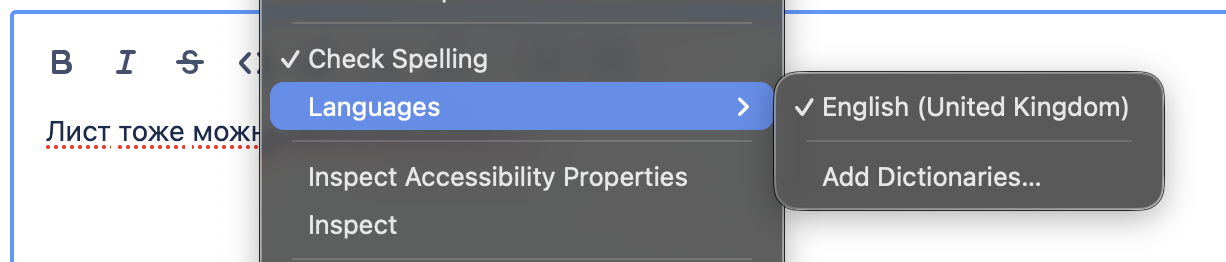
A language dictionary is added to add-ons but is not used in spellchecking

I am trying to get Russian language spellchecked.
I went to this url: https://addons.mozilla.org/en-GB/firefox/addon/russian-ru-language-pack/, installed the pack. Re-opened the browser. But nothing seemed to changed.
I use English locale.
Version 152.0.1 Build ID 20260617213557 Update Channel release User Agent Mozilla/5.0 (Macintosh; Intel Mac OS X 10.15; rv:152.0) Gecko/20100101 Firefox/152.0 OS Darwin 25.5.0 Darwin Kernel Version 25.5.0: Mon Apr 27 20:38:00 PDT 2026; root:xnu-12377.121.6~2/RELEASE_ARM64_T8103
Chosen Solution
dmitry.novoselov said
Figured out that I installed a language pack instead of a dictionary. Installed the dictionary, now spellchecking is fine. Actually, I thought that installing the language pack in effect installs all the dictionaries.
https://support.mozilla.org/en-US/kb/how-do-i-use-firefox-spell-checker https://support.mozilla.org/en-US/kb/use-firefox-another-language
The language Packs are a way to have say one Firefox install but be able to change the language of the menus and such between two or more languages.
It explains on top of https://addons.mozilla.org/firefox/language-tools/
Installing a dictionary add-on will add a new language option to your spell-checker, which checks your spelling as you type in Firefox. Language packs change your browser’s interface language, including menu options and settings.
Modified by James
All Replies (3)
Figured out that I installed a language pack instead of a dictionary. Installed the dictionary, now spellchecking is fine.
Actually, I thought that installing the language pack in effect installs all the dictionaries.
Modified by dmitry.novoselov
This is a language pack, you need a dictionary -> https://bugzilla.mozilla.org/show_bug.cgi?id=2040224
Chosen Solution
dmitry.novoselov said
Figured out that I installed a language pack instead of a dictionary. Installed the dictionary, now spellchecking is fine. Actually, I thought that installing the language pack in effect installs all the dictionaries.
https://support.mozilla.org/en-US/kb/how-do-i-use-firefox-spell-checker https://support.mozilla.org/en-US/kb/use-firefox-another-language
The language Packs are a way to have say one Firefox install but be able to change the language of the menus and such between two or more languages.
It explains on top of https://addons.mozilla.org/firefox/language-tools/
Installing a dictionary add-on will add a new language option to your spell-checker, which checks your spelling as you type in Firefox. Language packs change your browser’s interface language, including menu options and settings.
Modified by James