


Unable to setup sync on copied profile

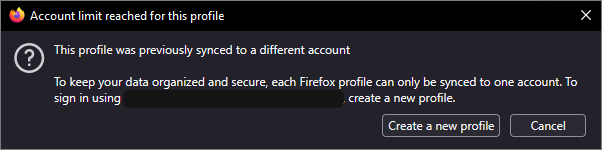
After copying profile that's already synced to my old account, I'm unable to set sync that copied profile to new mozilla account. According to support page, it should sync just fine by using different mozilla account. From what I noticed, this new copy profiles feature doesn't make a new profile in about:profiles, could this be an issue?
All Replies (3)
To correct myself:
this new copy profiles feature doesn't make a new profile in about:profiles, could this be an issue?
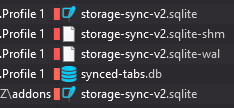
There's separate folder for the copied profile but for some reason it's not updated in about:profiles. I'm not sure which files are responsible for sync settings, but quick search found 5 files with "sync" in name. To be clear, I clicked on remove account on Sync settings page, before trying to log into new account, to my understanding that should remove those files?

Removing the account from Sync is the right first step, but I would avoid deleting random files with sync in the name. A copied profile can still contain account/session state in several places, and about:profiles only lists profiles registered in profiles.ini, not every folder copy.
Safer test: create a fresh profile from about:profiles, sign that fresh profile into the new Mozilla account, and let Sync bring over only the data types you want. If that works, the copied profile has old account state mixed in; you can move bookmarks/passwords manually from the old profile instead of trying to clean the Sync internals.
By finding those files, I tried to pinpoint what's causing this issue. Below support article doesn't mention that you can't sync copied profiles https://support.mozilla.org/en-US/kb/profile-management
I think they should include that information. As this seems like a intended design and I understand why sync is locked for copied profiles, it would be nice if we could, like tick a checkbox "i understand possible consequences" and let us proceed. Or just wipe clean password and other sensitive data lol.
While bookmarks and password are already easy to move to new profile, the copy function seemed great because it quickly copied all my settings and extensions. Guess I will have to go with doing it manually but perhaps they reconsider how it's designed.