


Why is Youtube not loading videos correctly seemingly at random?

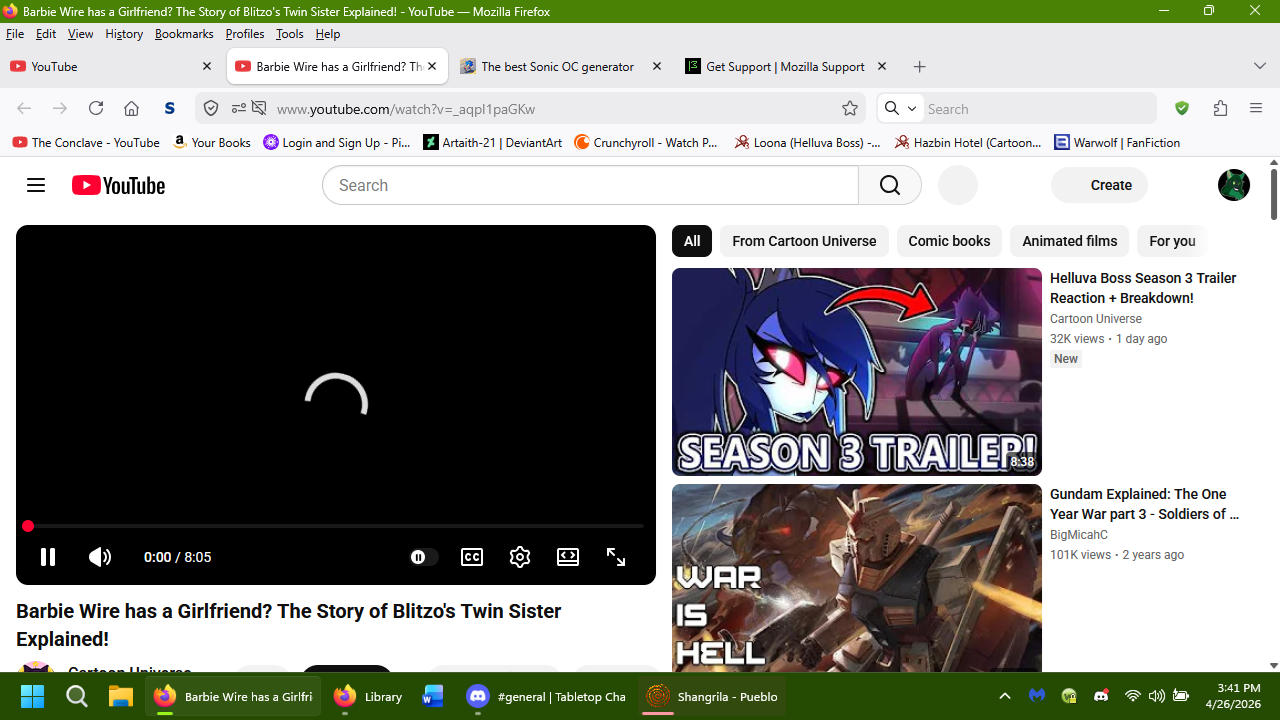
I have noticed that since around Friday, April 24th, 2026, that Youtube videos will sometimes refuse to load properly. The page for the video will come up, but buttons on the page will not load, and nor will the video. This started happening around mid-day, when prior to it, things had been fine. At first I thought it might be tied into the 'ambient mode' option on Youtube itself., But even after shutting that off, I found it was still happening at ranodm.
Is this something new Yotube is doing in their continued (idiotic) fight against ad blockers, or is there an actual glitch in the browser or, more likely, a glitch in Youtube? Like I said, this seems to occur at random and I can't trace the cause for it. I'll include a screenshot of what I'm seeing. But if anyone knows what's happening here, I'd appreciate it.
I should add that I am on Windows 11 and using the new version 150.0 for Firefox. (Congrats on that, by the way.)
I'll be honest, I keep hearing some other browser can block youtube ads innately. (Brave, I think it was called?) and while the idea is cool, I'm not giving up a browser I've used for over 20 years for it. If Firefox can find a way to implement a similar means of blocking Youtube ads innately, I;d love it. But for now, I just wanna know what the devil is happening with the site. Can anyone help?
All Replies (2)
It's most likely Youtube's fight against ad blockers. When opening a video, check the bottom left corner. Sometimes there is a message saying "Experiencing interruptions? Find out why.", which will lead you to a page blaming ad blockers: https://support.google.com/youtube/answer/3037019#check_ad_blockers&zippy=%2Ccheck-your-extensions-including-ad-blockers
You can try to disable your ad blocker to see if it still happens (or use a private window without extensions). Alternatively you can try another ad blocker like uBlock Origin, which is pretty fast in fixing issues most of the time.
Fylvara said
It's most likely Youtube's fight against ad blockers. When opening a video, check the bottom left corner. Sometimes there is a message saying "Experiencing interruptions? Find out why.", which will lead you to a page blaming ad blockers: https://support.google.com/youtube/answer/3037019#check_ad_blockers&zippy=%2Ccheck-your-extensions-including-ad-blockers You can try to disable your ad blocker to see if it still happens (or use a private window without extensions). Alternatively you can try another ad blocker like uBlock Origin, which is pretty fast in fixing issues most of the time.
I have seen that before, but with those instances, the page actually otherwise loads properly. With all icons and even the suggested videos coming up properly. Here, that's not what happens. But it could indeed be them fighting ad blockers again. I wish they'd knock it the hell off. All they did with that is just anger people and prevent any chance of people giving up ad blockers, especially since there is literally no quality control on Youtube for that kind of thing, and nobody wants to risk malicious ads getting airtime on their computers.
Is Mozilla looking into finding a way to prevent ads natively? Like I said, I've heard there's a browser that can do it, so I'm hoping other browsers will follow suit.