


Can't search in newsgroup message bodies.
In a newsgroup I have a message containing the word 'werewolf' in its body. If I do a control-K search for 'werewolf' I see 'No messages match your search'. In the left of the display I also see 'Filters From Me (0) To Me (0). I don't know what this means and I don't know why the search couldn't find a message containing 'werewolf'. If I do a control-shift-K search and select the 'Body' button I see 'No message found'. The control-shift-F search will not look in message bodies. Why can't I find the message that contains the word 'werewolf'? What am I missing? Alan.
Chosen Solution
You can add other categories from the newsgroup format. I think the only one not there is 'Newsgroups.' If you click cntl and U and view the source of a newsgroup message, I think you will see the topic 'Newsgroups' that shows the name of the news group. That's the only one I can think of. Here is a tip I wrote 11 years ago that still has some value that may help. Otherwise, I encourage you to just experiment a bit. https://davidskirk.org/thunderbirdtip.html good luck.
All Replies (7)
Here are the steps:
- rightclick on newsgroup name in folder pane
- select settings
- select the 'synchronization&storange pane
- click the advanced tab and tick the box to allow downloading messages
- now, click File>offline>download and tick 'newsgroups
- now, your search should work and offer the 'body' option in search menu.
david,
That worked for control-shift-K (but not control-K or control-shift-F), thank you, but I don’t really know what I have done.
“rightclick on newsgroup name in folder pane” – Yes.
“select settings” – I’m offered ‘Properties’, I hope that will do.
“select the 'synchronization&storange pane” I’m offered ‘Synchronisation’, I hope that will do.
“click the advanced tab and tick the box to allow downloading messages” There is no Advanced tab but there is a check box for 'Select this newsgroup for offline use', I selected it. There is also a button labelled 'Download Now', I pressed it.
“now, click File>offline>download and tick 'newsgroups” I went to File > Offline > Download/Sync Now and selected download and/or synchronise newsgroups, then clicked OK.
Do I enable 'Select this newsgroup for offline use' for each newsgroup I might want to search and then run ‘File > Offline > Download/Sync Now’ before each search?
Alan,
Yes, at the 'select for offline use', there should be a tick box for each newsgroup. I am not positive on whether file>offline>download is needed prior to serching, but I know it works. You might try searching at a later time after new messages are posted to see if a search is successful. My perception (and it's just that) is that the file>offline>download is needed. Good luck! :)
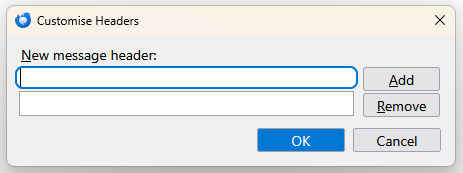
Thanks for that. While you are here, control-shift-F for newsgroups brings up a dialogue with a field selector in it. The fields offered are ‘Subject’, ‘From’, and ‘Customise...’. Selecting ‘Customise…’ brings up the dialogue in the screenshot. Can you tell me what I am supposed to do with this little form? Alan.
Chosen Solution
You can add other categories from the newsgroup format. I think the only one not there is 'Newsgroups.' If you click cntl and U and view the source of a newsgroup message, I think you will see the topic 'Newsgroups' that shows the name of the news group. That's the only one I can think of. Here is a tip I wrote 11 years ago that still has some value that may help. Otherwise, I encourage you to just experiment a bit. https://davidskirk.org/thunderbirdtip.html good luck.
david, Thanks, that makes sense now even though it is a bit cryptic. It’s a shame there is no topic called ‘Body’, Alan.
david, I did a test and it turns out it is necessary to run ‘File > Offline > Download/Sync Now’ after calling ‘Get Messages’ if a subsequent search is to be successful, Alan.