


IP Address Temporarily Blacklisted

Recently switched ISPs to a fiber internet company. After the switch, now whenever I try access my comcast email tunderbird gives me a message that my IP is temporarily blacklisted. I get two messages. One is a windows notification that says the blacklisted message, and then a popup message from tunderbird that it cannot log in. I have contacted my ISP to ask them what's up with the blacklist, but what's weird is that I can seem to access these accounts fine through Outlook, which would seem to indicate that there is some issue with tunderbird. I'd really rather use tunderbird than outlook. Can somebody help me with this?
The few articles I could find on this all suggest changing the IPv6 setting but I checked that and it is already set to what they suggest.
I tried deleting the account and recreating it in tunderbird, but it won't go through it says it can't log into the account.
All Replies (23)
Hi
When Thunderbird tries to connect to Comcast, your antivirus "listens" to that connection. It sees your new Fiber IP, checks it and decides it looks suspicious, and kills the connection before it even leaves your computer.
Thunderbird then pops up an error saying it "cannot log in"—not because your password is wrong, but because your antivirus literally cut the wire.
So to confirm this, you need to tell your security software that your new connection is safe.
Look closely at that Windows notification next time it pops up. It should have a small logo or name in the corner (e.g., "Norton Security" or "Bitdefender"). Does that notification show a specific brand name?
You can try to disable for 10 minutes your Antivirus and test again.
or You can go into your Antivirus settings and look for Email Shield od something and find a "Blocked IPs" list. You can clear that list or add Thunderbird as a "Trusted Application."
The logo on the windows notification is the tunderbird logo. Just to double check I did disable Norton, but got the same result.
Check Authentication Method (OAuth2)
1. If Outlook is using OAuth2 and Thunderbird isn't, Comcast might block the "less secure" Thunderbird attempt. Go to account > Settings Under Server Settings, look at Authentication Method. Change it to OAuth2 if it isn't already. Do the same for the Outgoing Server (SMTP) settings.
and try again.
2. You can also try to log into the Webmail portal in a browser. Sometimes, logging in there "validates" the new IP address for the account, which can clear the block for third-party apps like Thunderbird.
3. Maybe you can share internet from your mobile to connect for test. the you will know is your IP. and you can try to unplug your router for 30 minutes to see if you are assigned a new IP address from your ISP's pool. Comcast's servers see this IP and "Temporarily Blacklist" it.
Ok. Thank you for the help so far. Changing account settings made no difference. Can connect through the webmail and that works. Hasn't seemed to change anything with the client. Connecting through my phone and everything works with no issues. Left the fiber modem unplugged for a few hours and plugged it back in. I confirmed it has a new IP, but I still have the same issue.
If you used Norton then Norton would control the Firewall. when you disable Norton then automatically Windows OS default Firewall takes over control.
Enabled Norton again and do the following:
- Exit Thunderbird
- Access Norton, look for the Firewall
- Set up the Thunderbird program as an allowed app. Then at least the Firewall would not be blocking Thunderbird.
Confirm you have set up Thunderbird program as an allowed app.
If you do not want to use Norton or have uninstalled it: Access the Windows default Firewall and do the same - set up Thunderbird as an allowed program.
After you have made sure that Thunderbird has been set up as an allowed app so Firewall is not blocking it.
re :Changing account settings made no difference.
Outlook program should not be using Oauth because it's not a setting used by the Xfinity server.
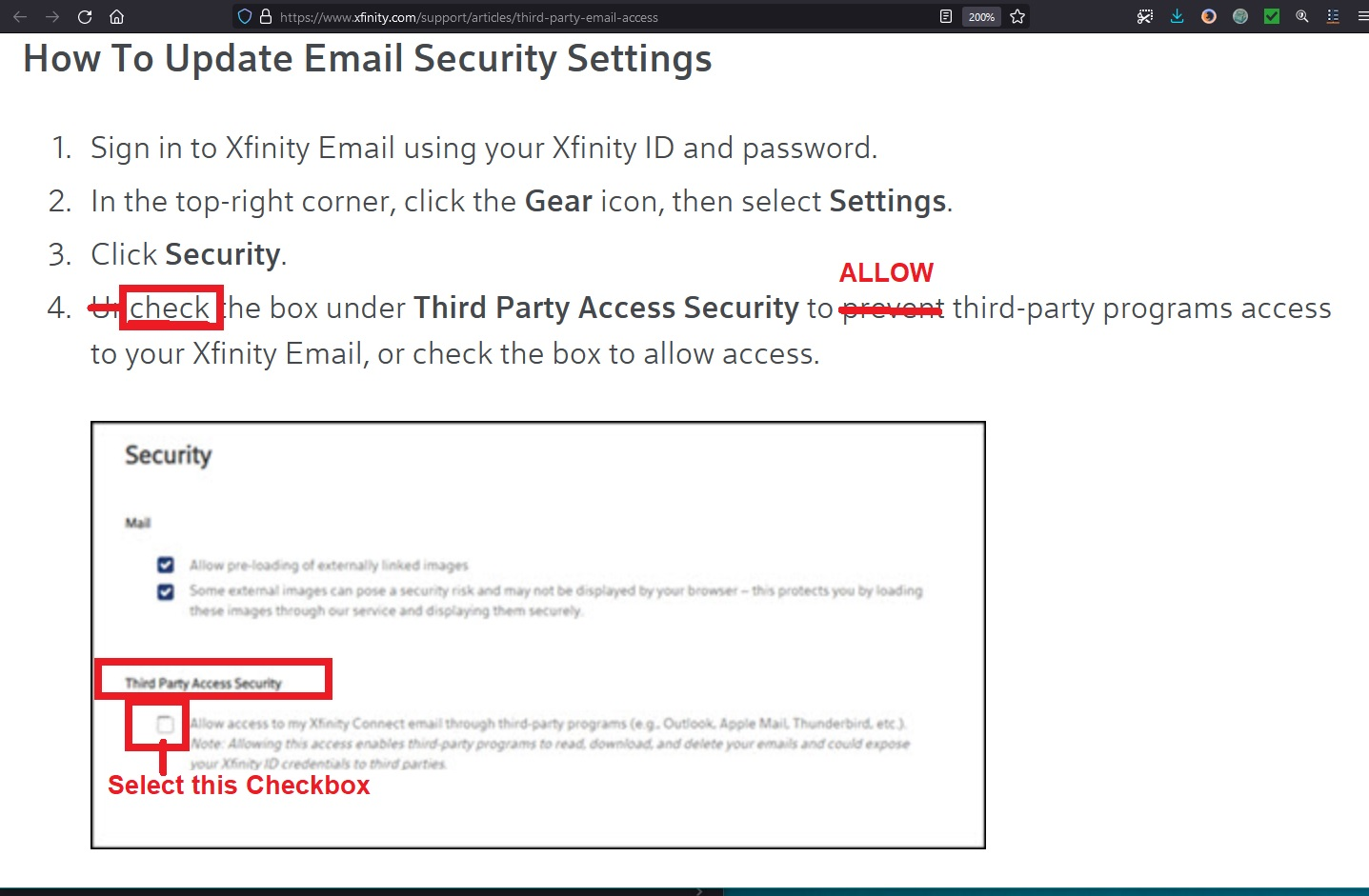
Xfinity is the server that takes care of 'comcast' accounts. First do this to check it's set up on server: Logon to webmail account and check the option to allow third party access is selected. I've had some people tell me this was somehow switched off. Some info at this link:
I've added an image below as a guide.
I'm presuming you created an Imap account as you seem to be accessing the data via other options.
Xfinity/comcast has very specific server settings and you can only use the following
Incoming IMAP: Server Name: imap.comcast.net Port : 993 Connection Security: SSL/TLS Authentication Method: Normal Password
Outgoing SMTP Server Name: smtp.comcast.net Port : 587 Connection Security: STARTTLS Authentication Method: Normal Password
The 'password' you use must be one you use to access the comcast webmail account via a browser. It's possible something may not be correct in the saved passwords, so I suggest you remove them and then try to reset afresh.
- Settings > Privacy & Security
- Passwords section
- click on 'Saved Passwords'
You should see two lines for the comcast account - one incoming imap and one outgoing smtp.
- Select each line and click on 'Remove'
- click on Close.
Exit Thunderbird and wait a few moments for background processes to complete. This ensures all the changes to preferences and password files get updated.
Restart Thunderbird. Comcast account should now be using correct server settings and you should get a prompt asking for password.
- Enter correct password
- select the checkbox to remember password
- click on Ok.
. After the switch, now whenever I try access my comcast email tunderbird gives me a message that my IP is temporarily blacklisted. I get two messages. One is a windows notification that says the blacklisted message,
If you still get the blacklisted error - please upload an image of it so we are not guessing. Usually when something is blacklisted it tells you a lot more information and often a link on information.
But - a thought - Norton offer a VPN. Access Norton and check for a VPN and switch it off, because that would be hiding your real IP address expected by the server.
Norton firewall already had Tunderbird listed as allow. Norton VPN is not enabled. No other VPN is enabled either. Account settings are correct. Confirmed by both a test connecting to the internet through my phone and the years previously that I've used this. The only thing that has changed is my ISP. I had also already tried deleting one of the accounts, and during account setup Tunderbird repeatedly said it could not connect. Eventually did the manual setup, using the settings you showed above, but it still has the same issue when logging in to check for new messages.
This is very strange. On one hand the only thing I've changed in my setup is the ISP. That includes a new modem but nothing else, still using the same router. Plus everything works when connected through my phone. This would seem to indicate some issue with the ISP or IP address as the program reports. On the other hand I can connect to comcast email servers just fine through Outlook. Which would suggest it is a tunderbird issue.
Is not a Thunderbird issue.
As you said "Connecting through my phone and everything works with no issues." So when using IP from your phone working. So i think is not a Thunderbird issue or your PC.
Thunderbird is just a messenger it sends messages from your IP address, using server configuration details that are provided by you and reports messages from receiving servers back to you.
Try to Enable IPv6 in Thunderbird: Go to Settings > General > Config Editor and search for network.dns.disableIPv6 and set it to true (this forces Thunderbird to use IPv4 only). Restart Thunderbird and check.
If that fails set it to false (This enables IPv6), restart TB and try again.
Changing ISP and hub/modem probably changed IP address.
Note: there are no changes as far as server settings for the mail account as that still needs to access the Xfinity servers. It's not Thunderbird refusing access but mention of blacklist means Xfinity spam filters are detecting something they do not like.
Please upload an image of the blacklist error. Usually when something is blacklisted it tells you a lot more information such as what IP it does not like and often a link on information.
Please use this link and then enter current IP address to see if there is a problem with it. https://check.spamhaus.org/
Does that error message just say "[AUTH] Temporarily blacklisted IP Address - try again later" ?
re : I've changed in my setup is the ISP. That includes a new modem but nothing else, still using the same router.
Log into router, go to security and then firewall. Check for blocked ports in the firewall settings. Unchecked the blocked ports Ports: 993, 995, 465, 587
re :IP address - Maybe this could help you.
https://www.xfinity.com/support/articles/releasing-and-renewing-ip-address
AS you mention new modem same router - Have you tried this:
- switch off router and unplug
- wait for a minute
- plug in router and switch on.
Modified by Toad-Hall
Changing the network.dns.disableIPv6 didn't make any difference.
The windows notification I get has no additional details. It reads: Mozilla Thunderbird ESR Thunderbird Alert from account [My email]: Temporarily blacklisted IP address - try again later No additional links or other information is provided.
Router firewall settings are not blocking those ports. To make sure I temporarily disabled it. Same result.
Releasing and renewing my IP address also did not change anything.
Router has been reset. Same issue.
fundamentally I think you will find the comcast will let you view mail from your new ISP but not send mail.
I can't do either, at least not from Tunderbird. Login for both IMAP and SMTP is being blocked. However Outlook works for both. I can both receive and send email there. If it's my ISP I don't understand why outlook works and Tunderbird doesn't.
I found this as a comment on the internet, you can try it.
Comcast has a security setting within their Webmail portal that controls whether "external" apps like Thunderbird are allowed to connect at all. If this was accidentally toggled off, Thunderbird will be blocked.
Log into your email at connect.xfinity.com.
Click the Gear icon (Settings) in the top-right corner.
Select Settings from the dropdown.
On the left-hand sidebar, click Security.
Look for a checkbox labeled "Third Party Access Security" (it might say "Allow access to my secondary email accounts through third-party programs").
Make sure this is checked. If it's already checked, try unchecking it, saving, then checking it again to "refresh" the rule.
George Kitsoukakis said
I found this as a comment on the internet, you can try it. Comcast has a security setting within their Webmail portal that controls whether "external" apps like Thunderbird are allowed to connect at all. If this was accidentally toggled off, Thunderbird will be blocked. Log into your email at connect.xfinity.com. Click the Gear icon (Settings) in the top-right corner. Select Settings from the dropdown. On the left-hand sidebar, click Security. Look for a checkbox labeled "Third Party Access Security" (it might say "Allow access to my secondary email accounts through third-party programs"). Make sure this is checked. If it's already checked, try unchecking it, saving, then checking it again to "refresh" the rule.
Hi George I mentioned to check that in an earlier comment and supplied an image as a guide. But not sure if it was checked.
Please look at this link as it was a solution for the person who posted it.
Basically check all the following:
- Enable IPv6 on your Router: Ensure your router is set to "DHCPv6" or "Prefix Delegation" so it gets a unique IPv6 address from the ISP.
- Enable IPv6 in Thunderbird: Go to Settings > General > Config Editor and ensure network.dns.disableIPv6 is set to false.
- The Result: Your computer will use its own unique, unshared IPv6 address to talk to Comcast. Since this address isn't shared with neighbors, you bypass the "IP Blacklist" meant for someone else.
Email account setting is set to allow 3rd part apps to access it. I did try resetting it, but didn't fix this. Router is set to use IPv6. Confirmed with the test site in the linked article. IPv6 setting in Thundrebird is set to False.
Ugh. It randomly started working today. For about 8 hours I could send and receive mail. Now it's broken again. And just as I was typing this....it worked again. What is up with this?