


But Why Tho
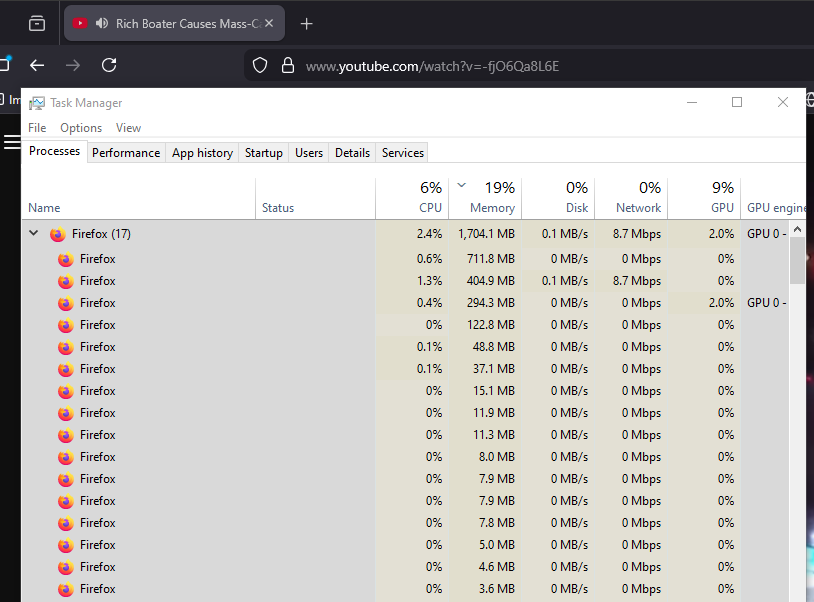
Why for 1 tab would there need to be this many different processes?
Why for 1 tab would there need to be this many different processes?
All Replies (3)
Hi
Do you have any add-ons installed in Firefox? I believe that each one will have its own process.
Paul said
Hi Do you have any add-ons installed in Firefox? I believe that each one will have its own process.
Just the "Return YouTube Dislikes" extension. Other than that I just run Firefox raw.
It is quite normal to see more Firefox processes running.
- process for the main Firefox thread (user interface)
- one or more content processes
you see more content processes when Fission is enabled - process for the compositor thread
- process for extensions
- process for WebRender when this feature is enabled
You can find the current multi-process state on the Troubleshooting Information page (about:support).
- "Help -> Troubleshooting Information"
"Application Basics":
Multiprocess Windows and Fission Windows
"Remote Processes" (Web Content)
You can check the about:memory and about:processes pages for info about all processes. There are several toolkit.aboutProcesses prefs in about:config to show more info. See also the about:unloads page for info about the tabs.