


the yellow marker star missing for new email in folder works in ver 128 but not in 148

after setting up a new install on another pc (ver148) and moving the profile folder over,
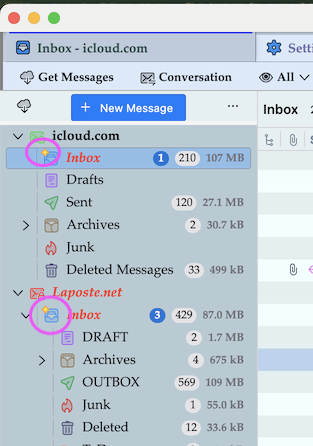
the only issue i have so far is the little yellow star in the folder for new mail having arrived in is not showing up. it will show the number of new msgs on the taskbar icon only.
can this be fixed?> can seem to see it in settings.
image attached of how it looks on the old pc
thanks

All Replies (9)
You're right, the little yellow rhombus, sticking to the account name in folder pane to indicate that new messages have arrived, has disappeared since version 148. Was it a deliberate decision of the developers? I wonder whether it's worth to open a new bug report for this minor nuisance....

It is standard and still used in 140-esr versions and in 147 release channel, but no longer in 148
Mapenzi said
You're right, the little yellow rhombus, sticking to the account name in folder pane to indicate that new messages have arrived, has disappeared since version 148. Was it a deliberate decision of the developers? I wonder whether it's worth to open a new bug report for this minor nuisance....
its not really a "minor nuisance" when people have more than 10 folders and need to check every folder each time to know where the new mail arrived to.... and its not replaced by another feature to indicate.
Was it a deliberate decision of the developers? - wouldn't it be in the change log?
maybe a bug

filz1 said
so this will be fixed in the next version? or?
As of now, not in this week's update - next month.