How Do I fix SEND wants password from another account?

First - sorry if the post is messy, but I don't see a Preview option today
PRELUDE: When I create a email to send to Joe@hotmail.com, on clicking SEND, a popup wants a password for a different account:
EXAMPLE: (emails are faked here for privacy)
Assume I have the following email accounts:
- john@fakes.xy
- jane@morefakes.vc
- fred@deftly.xc
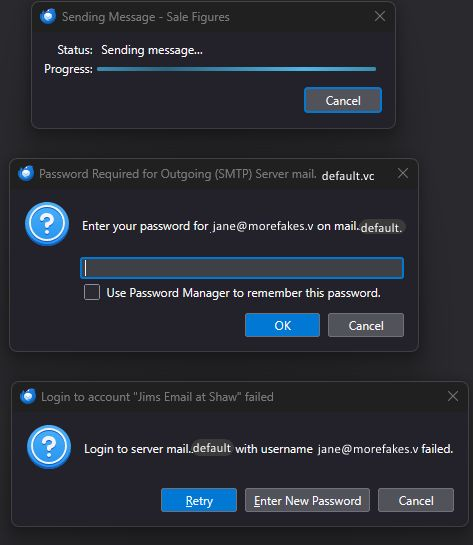
I compose a email to john@fakes.xy. I click SEND, and there is a popup stating:
Status: Sending message... Progress {progress bar}
and second popup with :
Enter your password for jane@morefakes.vc on mail.{IP name}.com
and a third popup with:
Login to server mail.{ip-name} with username jane@morefakes.vc failed
I have attached a screen cap (redacted) as seen in actual.
SUMMARY:
- When addressing email to Joe, upon SEND, the errors show password to use is listing a different account.
I ran Troubleshooting Mode with no errors, except, same thing. Wants password from a different email account.
Thanks for reading this, ~r
First - sorry ''if'' the post is messy, but I don't see a Preview option today
'''PRELUDE:'''
When I create a email to send to Joe@hotmail.com, on clicking SEND, a popup wants a password for a different account:
'''EXAMPLE''': (emails are faked here for privacy)
Assume I have the following email accounts:
# john@fakes.xy
# jane@morefakes.vc
# fred@deftly.xc
I '''compose a email to john@fakes.xy'''. I '''click SEND''', and there is a popup stating:
<blockquote>
Status: Sending message...
Progress {progress bar}
</blockquote>
and second popup with :
<blockquote>Enter your password for jane@morefakes.vc on mail.{IP name}.com </blockquote>
and a third popup with:
<blockquote>
Login to server mail.{ip-name} with username jane@morefakes.vc failed
</blockquote>
I have attached a screen cap (redacted) as seen in actual.
'''SUMMARY:'''
* When addressing email to Joe, upon SEND, the errors show password to use is listing a different account.
I ran Troubleshooting Mode with no errors, except, same thing. Wants password from a different email account.
Thanks for reading this,
~r