


YT videos on fullscreen leave a small margin on the left and upper side

Hey there.
When I try to watch YT videos on fullscreen, it's as if it was all a couple of milimeters moved to the right and to the bottom, that is, there's a thin left and upper margin on the screen that isn't covered. Other than that, the browser always covers the entire screen, even when I'm on YT. It's only the fullscreen mode that does this thing. Also, it doesn't happen with other browsers.
This only happens in my main screen (1440p), in my second one (1080p) it doesn't happen.
This is my pc:
MSI B550-A PRO B550 AMD Ryzen 7 5800X 3.8GHz Team Group T-Force Vulcan Z DDR4 3600MHz 2x16GB CL18 MSI GeForce RTX 5060 Ti VENTUS 2X OC PLUS 16GB Corsair RMe Series RM650e ATX 3.1 PCIe 5.1 650W Cybenetics 80 Plus Gold Modular Kioxia Exceria Pro 1 TB Disco SSD 7300MB/S NVMe PCIe 4.0 M.2
This is my main screen: Xiaomi G Pro 27i
When I restart Firefox in safe mode the issue disappears, but I tried disabling all my extensions and outside safe mode it keeps happening.
Hope somebody can help me.
Cheers.
All Replies (3)
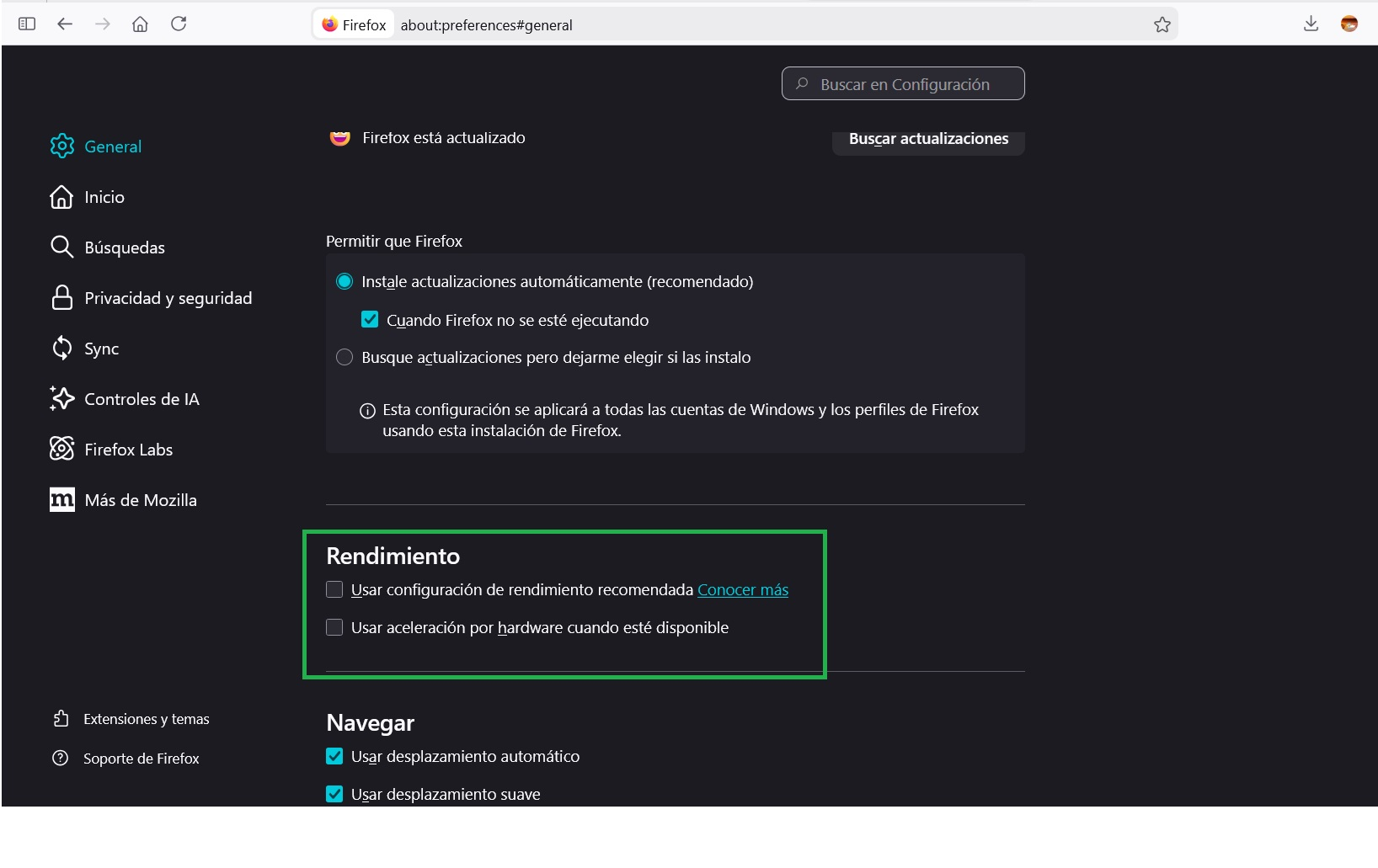
Hola, Puede probar desactivando la aceleración por hardware del Firefox, ver imagen adjunta,, si funciona el problema debería ser una incompatibilidad entre el Firefox y el driver de video, puede verificar si esta actualizado
Saludos
GerardoPcp04 dijo
Hola, Puede probar desactivando la aceleración por hardware del Firefox, ver imagen adjunta,, si funciona el problema debería ser una incompatibilidad entre el Firefox y el driver de video, puede verificar si esta actualizado Saludos
Hola.
Desactivar la aceleración por hardware no ha funcionado.
Tengo la versión 591.86 del driver de Nvidia.
Acabo de descubrir que no es sólo en YT, también pasa si maximizo un vídeo en X.
Gracias por la respuesta.
Hola, Esta utilizando el archivos de personalización avanzada userChrome.css? Esta utilizando algún "Tema" en el Firefox? En ese caso pruebe desactivandolos, se soluciona?
De lo contrario puede probar crear un perfil de Firefox nuevo sin realizar modificaciones ni agregar extensiones, si el problema no sucede ir agregando su personalización para saber cual produce el problema.
Saludos