


Windows 10 reached EOS (end of support) on October 14, 2025. If you are on Windows 10, see this article.

Search Support

Avoid support scams. We will never ask you to call or text a phone number or share personal information. Please report suspicious activity using the “Report Abuse” option.

Learn More

"Couldn't load XPCOM" repercussions!

  • 1 reply
  • 0 have this problem
  • 2 views
  • Last reply by david

Okay, I currently have two issues going on, both repercussions from transferring Thunderbird to my new computer. I'll limit this post to one issue!

My transfer to the new computer was not taking; followed instructions but no profiles were loading. I thought that perhaps this was due to my initial problematic installation of T-bird decades ago, where I eventually wound up with a choose-user-profile panel that worked fine with its default setting...so I lived with that easily (see image). Thinking that this was causing the inability to load profiles on the new machine, I tested whether I could delete the never-used profiles in that panel. After just one deletion, that resulted in the "Couldn't load XPCOM" error described here: https://support.mozilla.org/en-US/questions/1360766 Following the instructions on that page to do a repair installation (to the letter), starting T-bird now results in the attached "profile missing or inaccessible" message.

Please advise: Am I doomed?

Thanks for any honest advice. (yes, my Thunderbird installation is big: seven or eight addresses, many local folders, a large history and archives.)
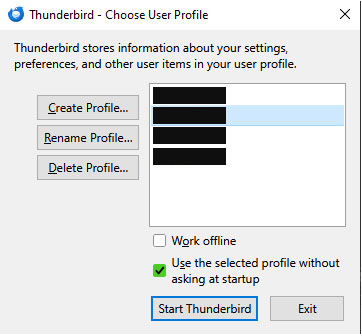
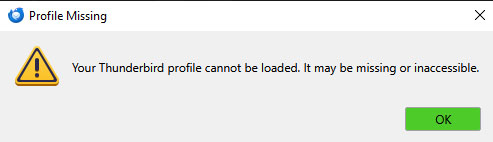
Okay, I currently have two issues going on, both repercussions from transferring Thunderbird to my new computer. I'll limit this post to one issue! My transfer to the new computer was not taking; followed instructions but no profiles were loading. I thought that perhaps this was due to my initial problematic installation of T-bird decades ago, where I eventually wound up with a choose-user-profile panel that worked fine with its default setting...so I lived with that easily (see image). Thinking that this was causing the inability to load profiles on the new machine, I tested whether I could delete the never-used profiles in that panel. After just one deletion, that resulted in the "Couldn't load XPCOM" error described here: [http://example.com https://support.mozilla.org/en-US/questions/1360766] Following the instructions on that page to do a repair installation (to the letter), starting T-bird now results in the attached "profile missing or inaccessible" message. Please advise: Am I doomed? Thanks for any honest advice. (yes, my Thunderbird installation is big: seven or eight addresses, many local folders, a large history and archives.)
Attached screenshots

Modified by motoflex

All Replies (1)

The error is a minor technical one. Thunderbird opens the profiles.ini file to get the name of the profile folder. the named folder has been removed or renamed and thunderbird then shuts down. If you know the name of the proper profile, you can edit the profiles.ini in notepad with the proper name. the file is at appdata\roaming\thunderbird. That's quick info. If this isn't your issue, report back.

Ask a question

You must log in to your account to reply to posts. Please start a new question, if you do not have an account yet.