


PKCS # 12 operation failed for unknown reason when importing an S/MIME client certificate

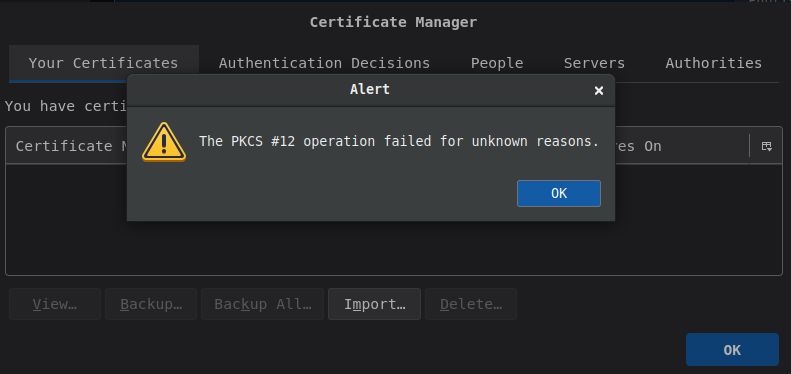
I successfully imported the self-signed CA certificate into thunderbird. Then I tried to import the p12 S/MIME client certificate and this error message popped up (cf. screenshot below).
However, I checked the client certificate and it seems fine:
- openssl pkcs12 -in smime-client-certificate.p12 -info -noout
Enter Import Password: MAC: sha256, Iteration 2048 MAC length: 32, salt length: 8 PKCS7 Encrypted data: PBES2, PBKDF2, AES-256-CBC, Iteration 2048, PRF hmacWithSHA256 Certificate bag PKCS7 Data Shrouded Keybag: PBES2, PBKDF2, AES-256-CBC, Iteration 2048, PRF hmacWithSHA256
- pk12util -l smime-client-certificate.p12
Enter password for PKCS12 file: Certificate(has private key):
   Data:
       Version: 3 (0x2)
       Serial Number: 1 (0x1)
       Signature Algorithm: PKCS #1 SHA-256 With RSA Encryption
       Issuer: "..."
       Validity:
           Not Before: Thu Feb 19 13:32:18 2026
           Not After : Sun Feb 17 13:32:18 2036
       Subject: "E=user@example.com,CN=user@example.com,
           O=example.com,ST=...,C=..."
       Subject Public Key Info:
           Public Key Algorithm: X9.62 elliptic edwards curve public key
       unknown SPKI algorithm type
       Raw:
           69:58:ee:5d:45:3f:10:d9:bb:8c:a3:b6:a5:c6:16:a6:
           53:78:65:77:73:5d:e0:6f:60:df:2c:32:f3:c2:e2:58
       Signed Extensions:
           Name: Certificate Basic Constraints
           Data: Is not a CA.
           Name: Certificate Key Usage
           Usages: Digital Signature
                   Non-Repudiation
                   Key Encipherment
           Name: Extended Key Usage
               E-Mail Protection Certificate
           Name: Certificate Subject Key ID
           Data:
               99:8a:6d:e4:ec:3a:25:5d:ad:26:a0:36:e1:da:a2:ea:
               bc:88:79:50
           Name: Certificate Authority Key Identifier
           Key ID:
               f5:6c:37:9a:37:d1:81:43:d3:54:3f:b9:33:23:85:c1:
               7e:17:73:88
           Name: Certificate Subject Alt Name
           RFC822 Name: "user@example.com"
   Signature Algorithm: PKCS #1 SHA-256 With RSA Encryption
   Signature:
       44:3a:5e:d7:44:51:f1:3c:a3:80:d8:54:f4:9c:d8:0b:
       ...
   Fingerprint (SHA-256):
       88:95:7A:DF:A5:7C:D1:E8:A5:55:A8:18:BD:BD:7D:92:1F:7D:6E:17:26:68:39:84:26:F3:F6:F3:4A:5C:56:90
   Fingerprint (SHA1):
       72:83:D0:13:C9:C9:AD:46:CA:C3:73:66:9E:79:5B:5C:3B:2E:81:47
Key(shrouded):
   Encryption algorithm: PKCS #5 Password Based Encryption v2
       Encryption:
           KDF: PKCS #5 Password Based Key Derive Function v2
               Parameters:
                   Salt:
                       dc:f9:bf:4a:80:e1:7c:4a:b4:f5:52:6b:9b:d5:75:ad
                   Iteration Count: 2048 (0x800)
                   KDF algorithm: HMAC SHA-256
           Cipher: AES-256-CBC
               Args:
                   04:10:0d:a4:96:03:00:2a:d5:a6:fe:d3:6c:a5:d0:12:
                   67:b3
What is going on and how to troubleshoot this issue as there is no logging about this matter into /var/log/syslog?
Environment: - Ubuntu 25.10 - thunderbird 2:1snap1-0ubuntu3
All Replies (2)

This may be your problem:
Public Key Algorithm: X9.62 elliptic edwards curve public key unknown SPKI algorithm type
When talking about Edwards curves it typically means Ed25519. Not sure if that is the same as your "X9.62 elliptic edwards curve", and whether Thunderbird supports it for S/MIME. Also, I have yet to come across a S/MIME cert not using a RSA key.