


My credentials are correct and I cannot send emails, but I can receive and manage them

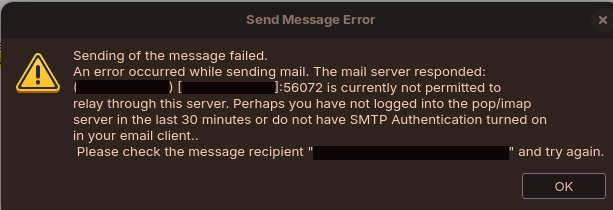
Over the last week I have been experiencing issues that prevent me from using Thunderbird on my computer. It had been working for a few weeks prior, with emails sending without issue. Without any apparent cause, and with the correct credentials set in my account settings, emails are no longer sending. They continue to be received with no issue, and I can move emails into folders etc.., which I immediately see reflected in Webmail. I get the attached error, every time I try to send an email, no matter which address I am trying to contact. I can log in to my account with the same credentials on different software on the same computer, and I have no issues with sending emails from that software, so I can't see how this would be an issue with my computer. I have tried removing the account, and adding it again. The credentials are accepted, but the issue persists. The email also works without any issues via Webmail. I have contacted the hosting company for support, but they have confirmed that this is an issue with Thunderbird. Please can somebody help?
Chosen solution
Do you have more than one account with this email provider? That is often, but not necessarily, the issue when the word 'relay' appears. This might also be an error if the SMTP server does not use your full email address.
Read this answer in context 👍 1All Replies (3)
Chosen Solution
Do you have more than one account with this email provider? That is often, but not necessarily, the issue when the word 'relay' appears. This might also be an error if the SMTP server does not use your full email address.
Thank you for your reply David! It prompted me to check my SMTP settings, where I could see that my full email was indeed being used. However, nothing was set under 'Authentication method', which I switched to 'Normal password'. This seems to have solved the issue! Very strange that it previously worked, and then became a problem. Very satisfying to have fixed though, so thanks again.