


deleting folder

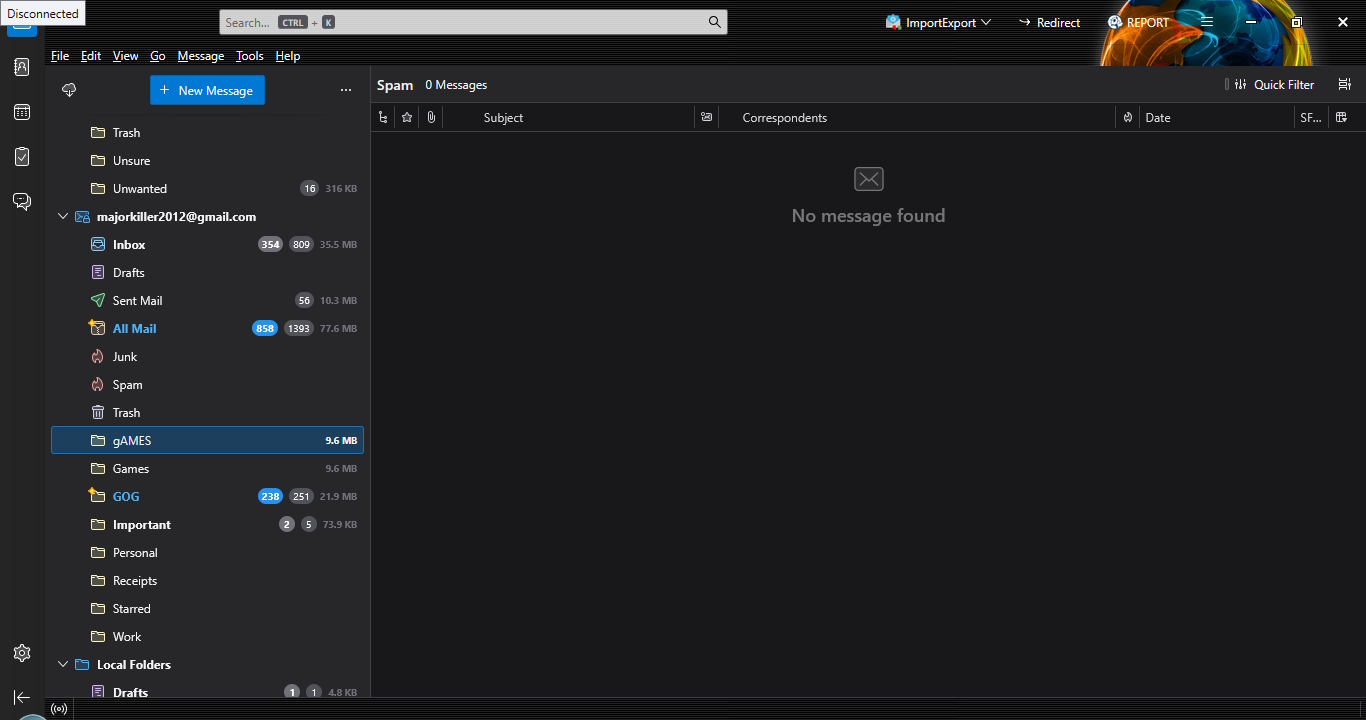
hi i went to create a folder in one of my emails which i did, but didnt see i spellet it incorrectly so i tried to rename it but it didnt rename instead it created a new folder with the correct spelling, i tries to delete the wrong one and i couldnt delete it, i moved the emails into the folder with the correct name and it moved into both folders which now doubled the size of the emails i had in the folders or thunderbirds database so i tried to delete the emails in the wrong folder and it delete all the emails in both folders but the folder stills the folders still the emails that where there but i cant see them and i cant compact the folders to save space
All Replies (3)
re :so i tried to delete the emails in the wrong folder and it delete all the emails in both folders
At least this part is easy to say what happened. So I'm only addressing that part of the issue first. Sorry for the verbose bit that follows :)
Gmail stores all is emails in the 'All Mail' folder. Gmail understands this is not good for organising or locating emails, so they invented 'Labels'. That means the 'Label' is like a tag put on the email stored in 'All Mail'. That email can now display a virtual view in any Label (aka folder in Thunderbird) mentioned against that email in 'All Mail'. Although in Thunderbird, it's a real copy because Thunderbird does not use labels like gmail.
If you delete an email from eg: 'gAMES', you are sending a message to gmail to delete that email. Gmail puts it in server Trash - removes all labels from email and then deletes it from the 'All Mail' folder. That means it's no longer displays in both labels - gAMES and Games. As imap folders synchronise with server folder/label to show what is on server, they simultaneously stop showing same email. The 'All MAil' folder also gets updated to remove the deleted email. So no matter how many copies you have - they all disappear at once because you sent the instruction to delete the email in 'All Mail'.
So, I hear you ask, how do I only delete an email from gAMES but not from Games ? You have to use the following technique.
- select email and hold down 'Shift' key whilst pressing on 'del' key.
This has the effect of deleting and by-passing the Trash. Beware there is no 'Undo' for this. What does it do? From your point of view, it removes the email only from the gAMES folder. From Gmail point of view - you sent instruction to remove the 'gAMES' label from that email stored in 'All Mail'. So email still exists in 'All Mail' with the 'Games' label meaning it still displays in the Games label/folder.
RE: All Mail You mention not wanting to get a doubling of size in Thunderbird profile storage when you see any emails in two sets of folders. However, as you also subscribe to see the 'All Mail' folder, that folder contains a copy of every email - incoming and outgoing and archived (stored in All Mail with no labels) - the lot. So your gmail account already has a double of everything.
I tend to advise people not to subscribe to the 'All MAil' folder because if you delete anything from that 'All Mail' folder you will be deleting that email from any other folder it resides in. Also, if your Anti-Virus product is allowed to scan folders and it attempts to fix something in that 'All Mail' folder, you stand a good chance of losing all your emails. It's adviseable to not allow any scanning of your Thunderbird profile because even if it finds something, you do not want it trying to fix anything. AV's have no understanding that one mbox file may contain a lot of emails.
re :i tries to delete the wrong one and i couldnt delete it, i moved the emails into the folder with the correct name and it moved into both folders
Now that is interesting and sounds weird; certainly not expected.
Compare the location info in both gAMES and Games to see if it says the same and report back with your findings.
- Right click on 'gAMES' folder and select 'Properties'
- 'Location:' imap://name%40gmail.com@imap.gmail.com/ ?
- For gAMES folder - What does it say at the end - gAMES or Games ?
- Right click on 'Games' folder and select 'Properties'
- 'Location:' imap://name%40gmail.com@imap.gmail.com/ ?
- For Games folder - What does it say at the end - gAMES or Games ?