


I have several current profiles (no idea why) and two are 2-4 Gb each
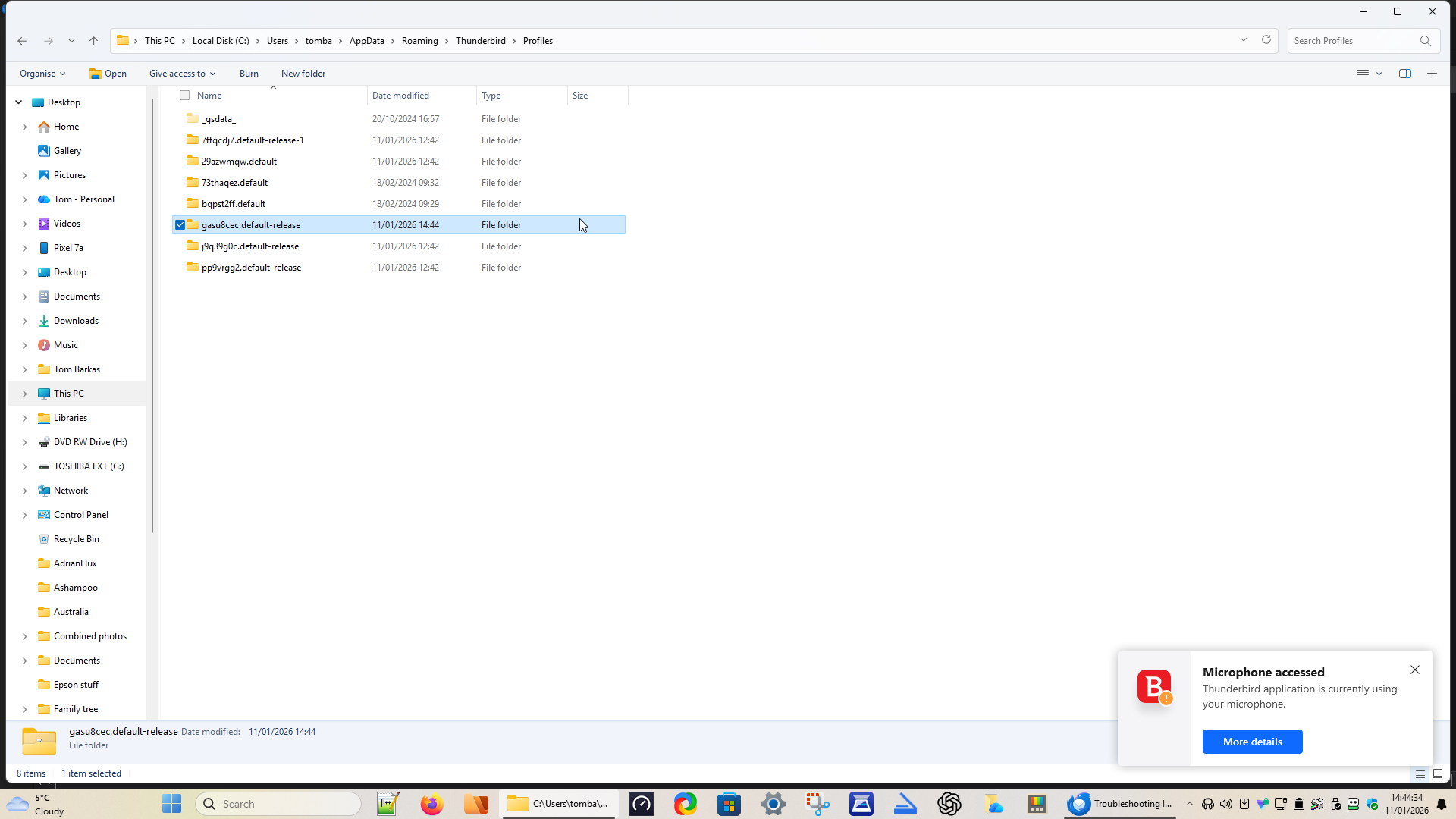
Hi, In profiles, I have several, many of which are up to date and 2 are large, one which is meant to be my current profile at about 2.5 Gb and another at 3.6 Gb (plus others of about 50 Mb) - see screenshot. What is going on?
Chosen solution
I would suggest you go to about:profiles It can be accessed in the first block on information in Troubleshooting information on the help menu as the third last item.
if those profile folders are registered in Thunderbird's profile.ini file they will be listed there. Click on the "launch profile" button and have a look at when it contains rather than trying to work it out from the file system.
Personally I use multiple profiles. Especially when I am messing around with very old Thunderbird versions like 3. because I do not want to mess up anything in the profile I use every day. Multiple profile can also occur if you use multiple versions of Thunderbird. See https://support.mozilla.org/en-US/kb/dedicated-profile-thunderbird-installation although I find Thunderbird just looses the plot occasionally and asks you to set it up all over again. Those that know can force the use of the existing profile. But most do not even realize what has happened until their contacts have not shown up or whatever caused the profile to be lost also prevents the adding of the email account in the new profile.
Note that there is no launch button for the profile you are using to get to the about:profiles page. Once you are satisfies you do not want a particular profile you can use the corresponding button to delete it.
All Replies (11)
First, I don't know, at least not yet. Here is my first suggestion: - for each account, go to 'account settings' and click the 'server settings's pane, and check the profile shown in the 'Local Folders' row at bottom of screen. - repeat that for Local Folders. - are they all in the default profile, or are some in different profiles? This can happen if you have moved accounts through the years. - if all are in the default profile, then the other profiles are possibly old ones from previous upgrades. I suggest reviewing the folders within them and the date last modified. Thunderbird only points to one profile, never two. If all accounts and local folders are in the default profile, you don't need the others. Since they are not being used, you could safely delete them. To be safe and protect from error, you might - exit thunderbird - move the other profiles elsewhere - restart thunderbird and verify that all accounts and Local Folders are ok.
Helpful as always, David, and I'll work through it tomorrow. What I don't understand is, if most are old folders, why do all 4 have today's date?
Helpful as always, David, and I'll work through it tomorrow. What I don't understand is, if most are old folders, why do 5 have today's date?
Good question, and I'm clueless. I cannot compare, as I only keep one profile. :)
david said
First, I don't know, at least not yet. Here is my first suggestion: - for each account, go to 'account settings' and click the 'server settings's pane, and check the profile shown in the 'Local Folders' row at bottom of screen. - repeat that for Local Folders. - are they all in the default profile, or are some in different profiles? This can happen if you have moved accounts through the years. - if all are in the default profile, then the other profiles are possibly old ones from previous upgrades. I suggest reviewing the folders within them and the date last modified. Thunderbird only points to one profile, never two. If all accounts and local folders are in the default profile, you don't need the others. Since they are not being used, you could safely delete them. To be safe and protect from error, you might - exit thunderbird - move the other profiles elsewhere - restart thunderbird and verify that all accounts and Local Folders are ok.
Hi David, I checked the profiles again. Two were from about a month ago, 1 was my real profile and the others were dated today, but 20 min instead of 1 min for the real one. I checked the two accounts and the local folder and all pointed to the real profile. I copied all 6 of the other profiles to another folder, then deleted them from Profiles, So far, TB appears quite happy.
Do I need the _gsdata_ folder?
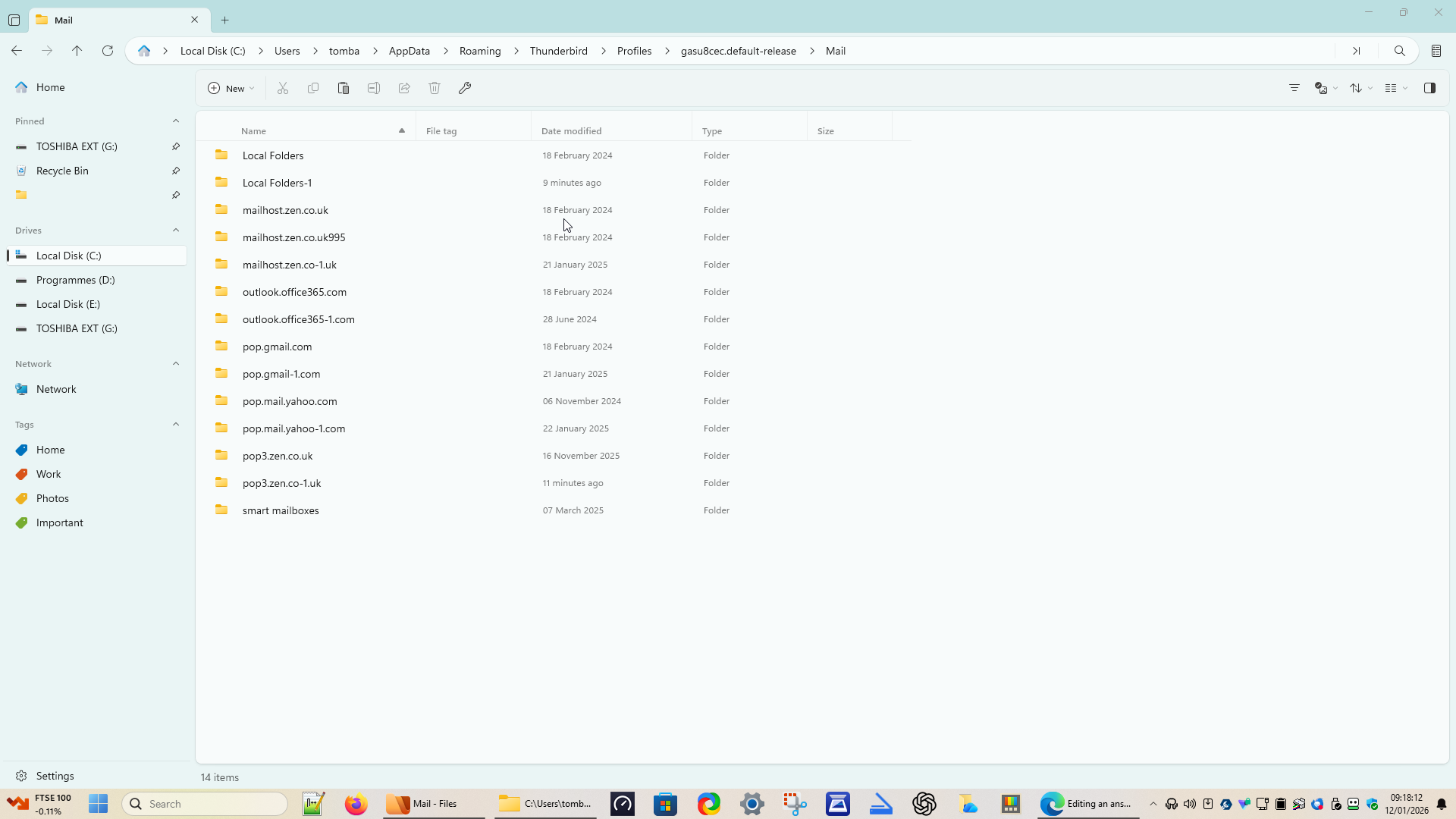
I added this edit, then lost it If I go into my real profile and folder Mail, I have multiple copies for each email setup (see screenshot). Is this normal and what do i do about it?
Modified by Tombarkas
Chosen Solution
I would suggest you go to about:profiles It can be accessed in the first block on information in Troubleshooting information on the help menu as the third last item.
if those profile folders are registered in Thunderbird's profile.ini file they will be listed there. Click on the "launch profile" button and have a look at when it contains rather than trying to work it out from the file system.
Personally I use multiple profiles. Especially when I am messing around with very old Thunderbird versions like 3. because I do not want to mess up anything in the profile I use every day. Multiple profile can also occur if you use multiple versions of Thunderbird. See https://support.mozilla.org/en-US/kb/dedicated-profile-thunderbird-installation although I find Thunderbird just looses the plot occasionally and asks you to set it up all over again. Those that know can force the use of the existing profile. But most do not even realize what has happened until their contacts have not shown up or whatever caused the profile to be lost also prevents the adding of the email account in the new profile.
Note that there is no launch button for the profile you are using to get to the about:profiles page. Once you are satisfies you do not want a particular profile you can use the corresponding button to delete it.
My thought on the 'gsdata' folder is that, since I've never seen one, it's probably not needed. You could rename and, if not needed, then delete it.
On the question of multiple accounts, the solution is to repeat the look at each 'server setting' pane, this time not for the profile name, but for the account name. If the local server is pointing to a '-1' entry, that is the actual account.
> Hi David, I checked the profiles again. Two were from about a month ago, 1 was my real profile and the others were dated today, but 20 min instead of 1 min for the real one. I checked the two accounts and the local folder and all pointed to the real profile. I copied all 6 of the other profiles to another folder, then deleted them from Profiles, So far, TB appears quite happy.
Please use the actual profile names when referring to them, for clarity.
It occurs to me that if you have multiple accounts, that it's possible that one or more might not all be in the same profile. They might be disbursed. Check each account in Account Settings > Server Settings > Local Directory to ensure they all point to the same profile, including Local Folders. (I have this exact problem myself, and I don't know how it happened. I've decided to live with it for now.) It's even possible that individual folders might be misplaced.
You might also have address books that are not all in the same profile.
david said
My thought on the 'gsdata' folder is that, since I've never seen one, it's probably not needed. You could rename and, if not needed, then delete it. On the question of multiple accounts, the solution is to repeat the look at each 'server setting' pane, this time not for the profile name, but for the account name. If the local server is pointing to a '-1' entry, that is the actual account.
I've released what it is - I back up emails using Goodsync and this folder is from that.
My brain is numb at the moment - could you explain the second paragraph again, please?
Matt said
I would suggest you go to about:profiles It can be accessed in the first block on information in Troubleshooting information on the help menu as the third last item. if those profile folders are registered in Thunderbird's profile.ini file they will be listed there. Click on the "launch profile" button and have a look at when it contains rather than trying to work it out from the file system. Personally I use multiple profiles. Especially when I am messing around with very old Thunderbird versions like 3. because I do not want to mess up anything in the profile I use every day. Multiple profile can also occur if you use multiple versions of Thunderbird. See https://support.mozilla.org/en-US/kb/dedicated-profile-thunderbird-installation although I find Thunderbird just looses the plot occasionally and asks you to set it up all over again. Those that know can force the use of the existing profile. But most do not even realize what has happened until their contacts have not shown up or whatever caused the profile to be lost also prevents the adding of the email account in the new profile. Note that there is no launch button for the profile you are using to get to the about:profiles page. Once you are satisfies you do not want a particular profile you can use the corresponding button to delete it.
I've been to about profiles and have realized that most (the small ones) do not have a Mail folder, but one has a 3.5 Gb mail folder. This is a hangover from the number of times I've had to reinstall Thunderbird - it contains all my emails from 2019-2023, while the default one has emails from 2023- now. I don't suppose there is any way of merging them?
Regarding 'the second paragraph', you did this earlier to determine that all accounts were in the default profile. I am suggesting repeating that to check whether the account folder is the one ending in '-1' or not - that was a concern of yours. if you click the 'server settings' for each account and look at the bottom row that links to server, it will show you the active folder. For example, you had posted a screenshot showing pop.gmail.com and pop.gmail-1.com. If you have only one POP gmail account, then one of those is the active account and the other is not used. However, if you have two gmail POP accounts, then you will see one account with one and one with the other.
Yes, you can merge the messages. If message folder is on PC (not server), you can use the importexporttools addon to highlght the folder, rightclick and select export eml, and then highlight the folder to which you wish to merge those messages, rightclick and select import eml.