


To empty Trash.

How does one take away many entries in Trash with one sweep instead of one by one? I was able to do this before my marking all of the items and then clicking CTRL and X, but that no longer works.
How does one take away many entries in Trash with one sweep instead of one by one? I was able to do this before my marking all of the items and then clicking CTRL and X, but that no longer works.
Chosen solution
Why don't you use R-click > Empty Trash ?
Read this answer in context 👍 1All Replies (3)
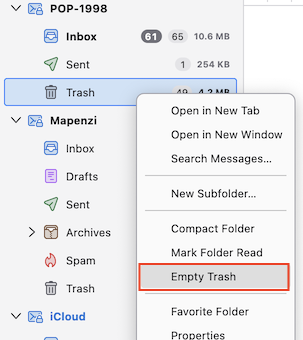
Many, many thanks, Suggestion: your excellent help would have even been better if I had been instructed to make a left click.
Sorry, in my system (macOS) the context menu still opens via a right click (or Ctrl + left click)...