


Moving Bulk Folder

Hi. Somehow, in Thunderbird Mail, I moved the "Bulk" folder into the "Trash" folder and now I can't reverse that. Some of my mail is going to the "Bulk" folder and I'm forgetting to check that, thus missing emails. Is there a way to move that "Bulk" folder back where it belongs? thanks in advance
All Replies (18)

yep...it won't let me...I think it's a Yahoo problem, as this is with my Yahoo/Imap mail
Modified by vernsgirl57
There are some things that I might try at my own risk, but I don't know what to suggest to someone else because "Bulk" is a special server folder at Yahoo, so it has to be treated specially.
Where is the bulk folder in webmail? Is it in the trash there?
it's just under "folders" in both webmail (on my windows pc) and on the Yahoo Mail app on my Android phone
Maybe this could be helpful …
Right click on the account name in the folder pane. Select "Subscribe" in the drop-down menu that appears. In the list that appears next, what do you see for bulk folders? Just one, in the trash? More than one?
when I right click on the account name (in the pc thunderbird program), and then click on 'subscribe', I see a list, and within that list are all of the folders with check-marked boxes out to the right of each folder. In that list, I see a "bulk" folder with a checkmark, and also in the "trash" folder, I see a "bulk" subfolder. I've attached 2 pics (with some names blacked out for privacy) Ugh...I really messed this up, didn't I :)
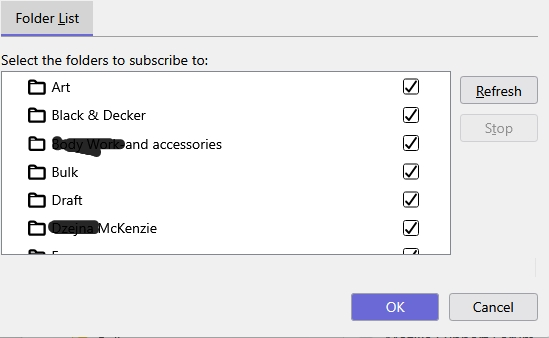
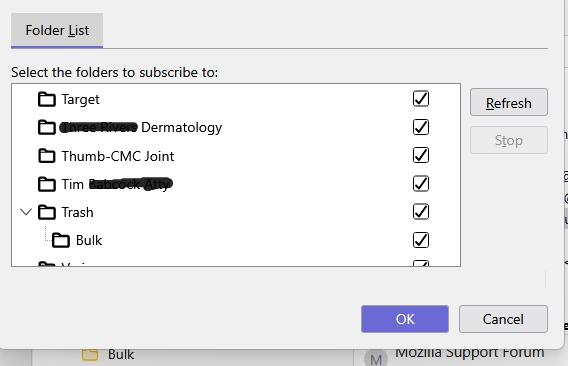
Do you have the red icon on your bulk folder?
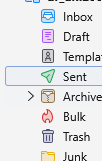
Do you have that icon on any other folder? like a junk folder? or a spam one?
Modified by Matt
yep, that red icon in in front of the "bulk" folder, which is in the trash folder. No other place. Pic attached
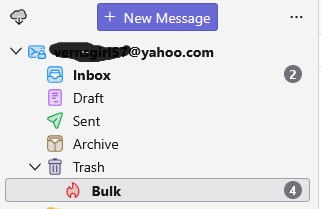

Vern's Girl and Codegrule9, do you both have a bulk folder at the top level of the folder hierarchy in addition to the one in the trash? And the icon for the one in the trash is what is the red one that is shown in the screen images above? What is the icon for the bulk folder that is outside the trash?
When you right click on the account and select "Subscribe", does more than one bulk folder appear in the list?
Matt, would the solution here be helpful or only risky or counter-productive?
I'm sorry that I have no special knowledge about this problem. I thought that I might be able to help, but I cannot. I did some experiments this morning, but they did not produce anything useful.
codegrule9 said
Folderflag extention will not load on Firefox. It says it is not verified
I just added it to 140.8. Did you actually try Firefox instead of Thunderbird?
I have no idea if that add-on can help in any way. Proceed at your own risk.