


Some filters not working
I have 21 filters set up in Thunderbird (originally on the Mac, now on Windows). This is for an IMAP account.
Most of the filters are simple, one match, mark message as read, move to a folder. A few have multiple matches, but the same mark read and move to folder steps.
Some filters work fine, some do not work at all. The ones that are not working are the simple single match ones. There's nothing in the filter log showing what the issue might be. The filter in question doesn't show up.
What can I do to track down what the issue might be?
Thanks.
Chosen solution
try changing the filter to run after classification. It delays the filter just a little, but it does make the body of the message always available. It is not always there when filters kick off for IMAP email.
Another possibility here is that the filters are set to execute on the incorrect account. Thunderbird defaults to the local folders account when a filter is created and your account does not appear to be the local folders account.
What account is shown in the first dialog that opens when you select you filters.
Just curious, but I have always assumed images that have the three dots in the corner that this one does show the operating system to be apple but you are saying you are using Window. The start menu is windows so are you using some form of desktop sharing?
All Replies (15)
It is possible that another filter is involved. My suggestion is to disable the other filters and then retest this one.
Disabled all the other filters, hit run now and nothing happened.
If that is the only filter running, please post a screenshot of it so we can review. thanks
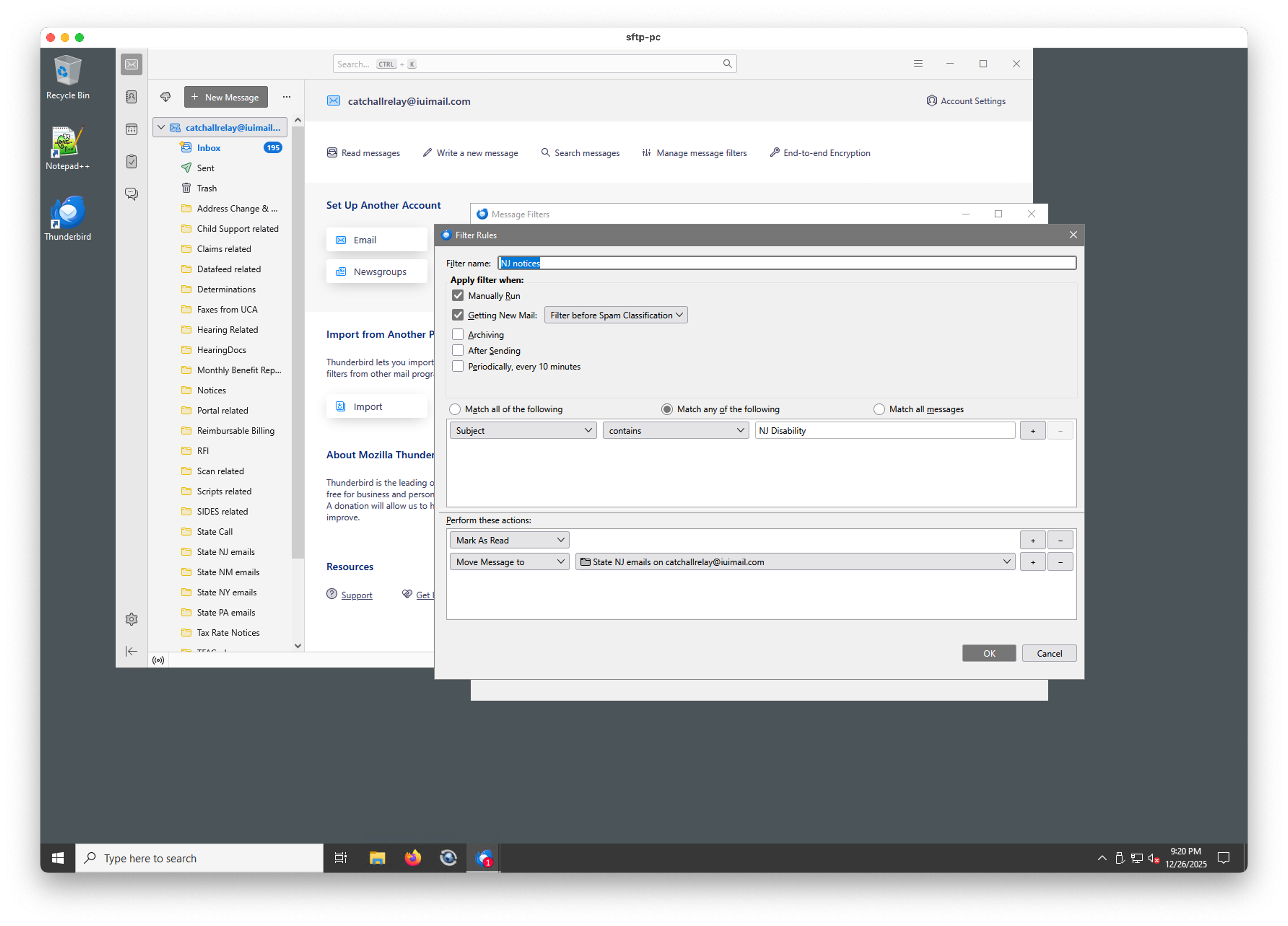
Here's the screenshot of the filter
Have you confirmed that the filter is set to run on the inbox?
Are there any trailing spaces in the match criterion?
A screenshot of the message that isn't being filtered may also help. That would ensure we are seeing a complete picture of the issue.
Here's a screenshot with a few messages that should have matched.
There is no trailing space in the filter match criteria.
It's not clear to me how to confirm the filter is set to run on the inbox. When I run it manually, I made sure to choose the inbox.
Modified
Suggestion: rename the folder 'State NJ emails' to 'StateNJemails' and try again.
OK, tried that, no change.
When you renamed the target folder, you should have gotten a notice that the filter was being changed to now use the new folder name. If that did not happen then the target folder specified in the filter is not matching.
I have renamed folders in the past, and turned off that notification.
I did verify that the folder in the script was the correct name after the rename.
Chosen Solution
try changing the filter to run after classification. It delays the filter just a little, but it does make the body of the message always available. It is not always there when filters kick off for IMAP email.
Another possibility here is that the filters are set to execute on the incorrect account. Thunderbird defaults to the local folders account when a filter is created and your account does not appear to be the local folders account.
What account is shown in the first dialog that opens when you select you filters.
Just curious, but I have always assumed images that have the three dots in the corner that this one does show the operating system to be apple but you are saying you are using Window. The start menu is windows so are you using some form of desktop sharing?
Changing it to run after the classification seems to have fixed it.
However, at this point, I've written PHP code to handle moving the messages.
As for the Mac title bar, I'm using remote desktop to control the machine.
Thanks.
just how will the Thunderbird global index know where mail is if you move it using a knife and a trowel? You are basically going to have to delete the global message database every time you run your PHP and also be sure to do it while Thunderbird is not running and also also the related MSF file on both the source and destinations as Thunderbird will not be aware they have changed as it did not perform the moves.
On a similar topic, I am not sure when the single database store to replace the MBOX files and MSF files that Thunderbird uses now will be making an appearance, but folk have been working on it more than a year. So just be aware you might completely corrupt all sorts of things with external tools that rely on the software storing data in what has been the historical standard. Because the new stuff is completely invisible to the user there is quite a likelihood that the release will be low key. Just as the complete replacement of the components that made up the traditional three pane folder mail view really hardly even surfaced in the release notes.
I've run the PHP code a number of times, and Thunderbird (both Mac and Windows versions are running on that account) just updates the mailboxes as the messages get moved. Since it's IMAP, I'm not sure why there would be an issue since ANY IMAP client could move messages at any time, which is the whole point of using IMAP.