


Thunderbird password I've used for years doesn't work

The Thunderbird password I've used for YEARS (and is stored in "Saved Passwords") no longer works. I have two laptops with the same password, and they both ceased (on the same day) allowing downloads (or sending) of emails. This occurs on both my laptops -- one has TB version 115.10.1 w/ Windows 10, and the other has 140.5.0esr w/ Windows 11. It also occurs on my iPhone when trying to access the mail server.
Could the problem be the mail server itself?
Please Advise
Bob Hawkins
Modified by rehawkpe
Chosen solution
Problem SOLVED!! I called Maxxsouth.net (my internet provider) tech support and explained my problem the best I could to at least 3 of them. Then the next day, I tried to open Thunderbird, using my normal password, and it worked!
I don't know what they did, because they never called me back to ask about it, but it's been working for several days now.
Thank you all for your suggestions!
Read this answer in context 👍 0All Replies (9)
Who is the provider? They might have changed their password requirements or authentication method.
Internet Provider is Maxxsouth.net, and the password I use is the same as exists in the Saved Passwords box of the Settings in Tbird.
My laptop has Windows 10, which was recently cast into the outer darkness by Microsoft, but I can go to my Maxxsouth Mail app and receive all the emails that TB doesn't recognize, so Win10 is likely not the problem. I have a Win11 laptop and it does the same thing.
Hope this helps.
As far as I can tell, the only requirement is that the password must be at least 8 characters.
https://www.maxxsouth.com/sites/default/files/2021-02/MKT200509EmailMigrationFAQ%20-%20MaxxSouth.pdf
The fact it also doesn't work on the phone suggests the problem lies at the maxxsouth end.
I can go to https://mail.maxxsouth.net/ and get all my emails, using the same password I use in Thunderbird.
Using my iPhone, when I open the Mail app, I instantly get the message ' Password Incorrect, enter the password for the IMAP account "Maxxsouth" ' (I don't think I've
I have used this password for emails for as long as I've been receiving them using Thunderbird or my iPhone, with no trouble at all until this latest difugilty.
Could I have been hit by a virus?
Post a screenshot or the exact wording of the error when connecting with TB. State the security/AV software and whether it has a built-in password manager.
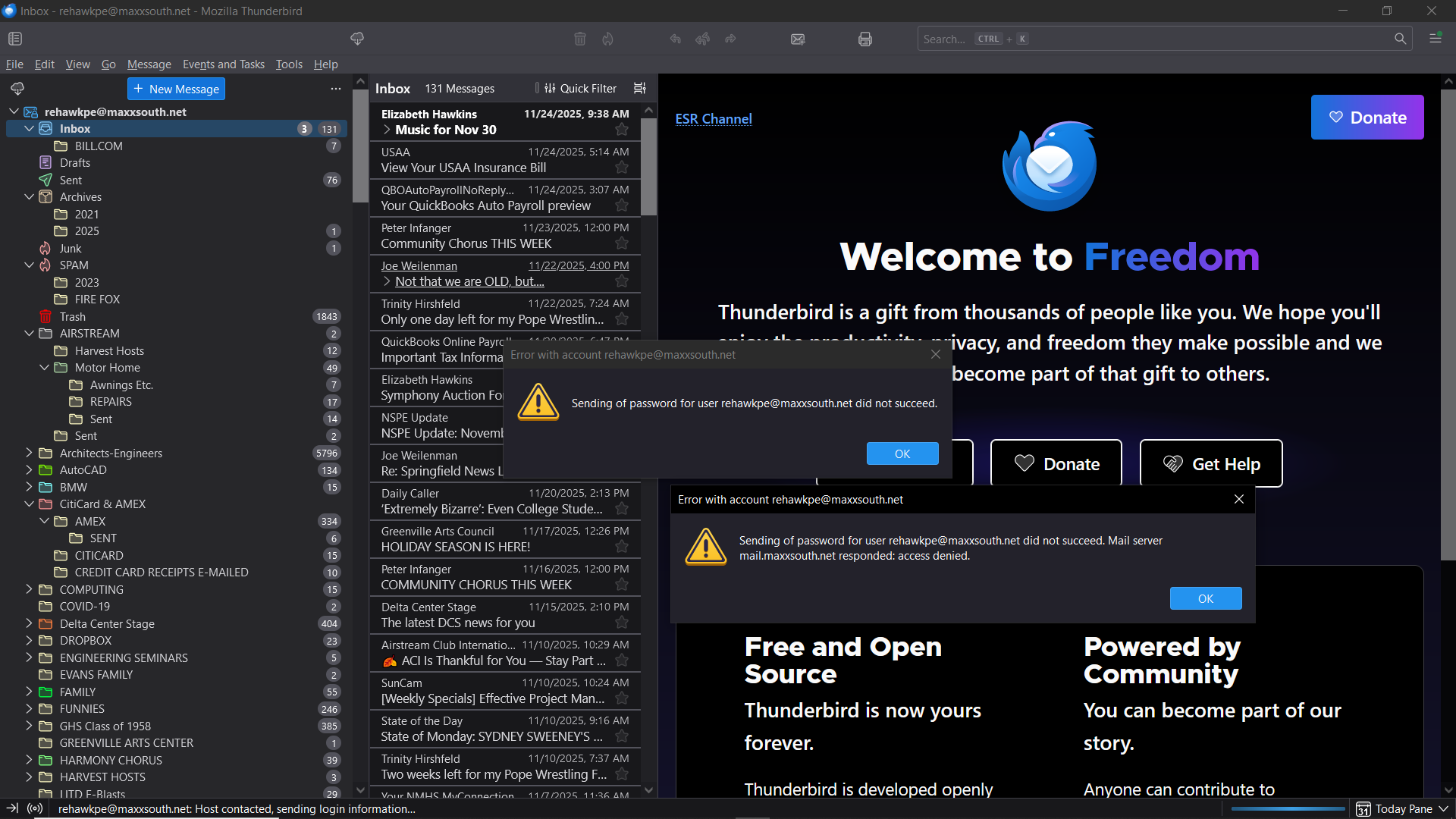
I don't know if Avast or its Password Manager is interfering, but running Windows in safe mode, or temporarily removing Avast, is a way to test it.
Chosen Solution
Problem SOLVED!! I called Maxxsouth.net (my internet provider) tech support and explained my problem the best I could to at least 3 of them. Then the next day, I tried to open Thunderbird, using my normal password, and it worked!
I don't know what they did, because they never called me back to ask about it, but it's been working for several days now.
Thank you all for your suggestions!