


Email List Columns Changing Widths on Thunderbird re-Opening

I'm running Thunderbird 140.5.0esr (32-bit) on Windows 10 Pro Build 19045. After the last few updates the columns in the email listings are changing widths from what I've set them, this seems to happen after I close then reopen Thunderbird; which I'm having to do more often these days to resolve weird calendar malfunctions. For instance, the data column would appear so narrow that only the month/day show with "..." at the end, when I know I've looked at this yesterday with the full view of the date and time showing. I've reviewed my options and I've set them individually, set them globally and it makes no difference. Of course I've rebooted, etc. I have over a hundred local folders and they all change differently, of course some look the same but others don't. Most have the same column headings selected but it doesn't seem to matter. Some have the "Correspondents" column selected but many don't.
This is very irritating and I'd like to know why Thunderbird is doing this, and more importantly, how can I prevent this behavior in the future. Thanks,
All Replies (10)
This usually means something is interfering with Thunderbird's update of settings at shutdown. This might be an antivirus product or other firewall issue. This can often be verified by clicking help>troubleshootinginformation, scroll to 'profile folder' and click 'open folder.' the settings file is named prefs.js. If you see more than one, such as prefs-1.js, prefs-2.js, that is an indication of the problem. This occasionally happens when prefs.js is marked read-only. I do not know the solution for your particular situation. This may not be your problem, but it does show the same symptoms.
I looked in my profile and noticed that there were three (3) extra "prefs-{n}.js" files. I deleted them, because they all had much older "Date Modified" dates in Windows than the "prefs.js" file whose date was today, then closed Thunderbird. I reopened Thunderbird and looked at my IMAP inbox email listing and it had changed. My column headings are: Thread, Starred, Attachments (very narrow), Subject (wide), Read Status (very narrow), From (not quite as wide as subject), Spam (very narrow), Date (wide enough to display date and time), and size (wide enough to display size). I sized them the way I wanted then applied them to some of my local folders. I'll readjust the columns, assign them to other folders and see how that works.
Thanks for your help.
Bill

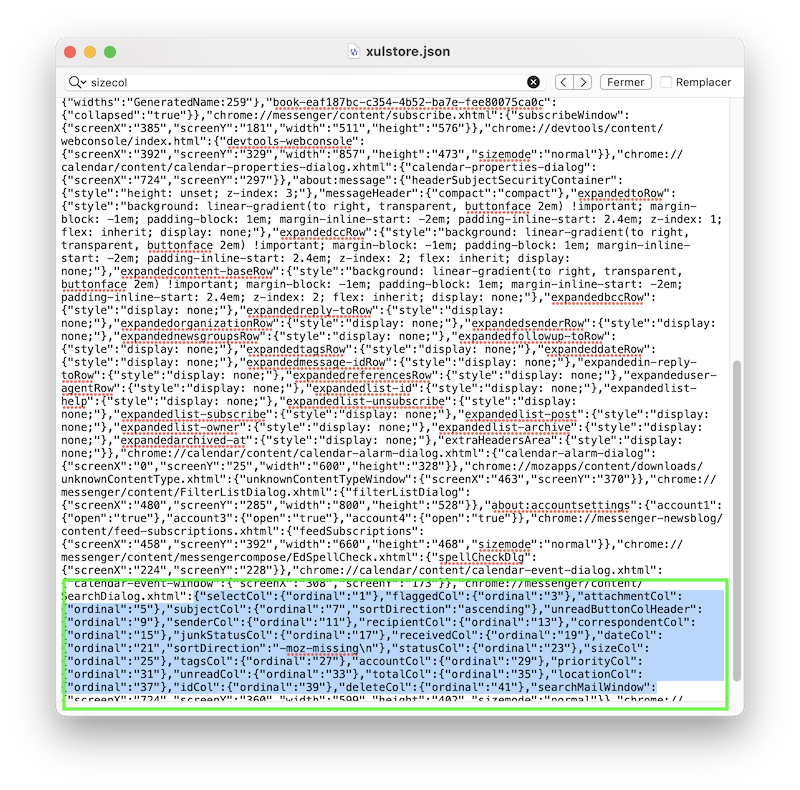
David, the thread pane column widths are not stored in the prefs.js file but in the xulstore.json file (image)
Mapenzi, THANK YOU. I know little about the json files. I appreciate your sharing this.
I think this is a little derailed.
The xulstore.json stores information related to the calendar interface. Data about the various column in mail folders is stored in the relevant MSF files (One per folder).
I started this to ask if those files are being updated at all and it is still relevant. It can be that repairing a folder or building a new index post compact can also changes some things in unintended ways. The more the developers tinker with their new message database, the more of these odd glitches I think we may see (in the end there will be no MSF files is my understanding. But as of now they are a critical component of showing you your mail lists.
MSF files update on new mail, compacting changing read status etc. So what I am asking really is for you to look for a common denominator. Perhaps a compact of a folder that has had much mail moved out of it or deleted might be the trigger for the change. It might be only folders that have had mail that has triggered some sort of virus alert.
Thanks! Contrary to more than 400 prefs-(nnn).js files in a French Mozilla forum user's Thunderbird profile I have never seen more then one xulstore.json file in one profile. I propose that - TB closed - you rename the xulstore.json to xulstore.json-old, then restart TB. On restart you will have a rather strange view of the Thunderbird main window and its different panes since all height and width settings will be default and not your usual customisation. That's why you should not delete your xulstore.json file as a first step, so you can always go back.
Now customise the choice of your thread pane columns to be displayed and their respective width, quit and restart TB and verify if columns and widths have been memorised.
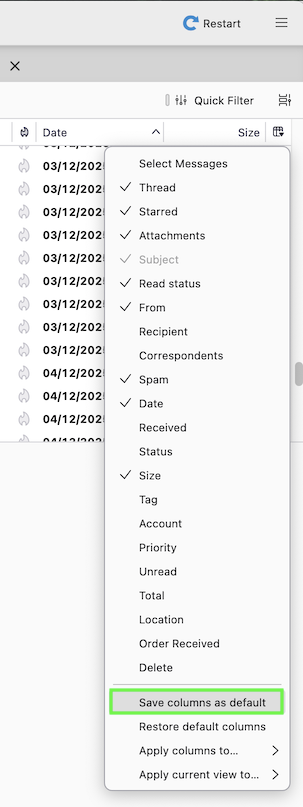
You can also install the "DefaultColumns" add-on https://www.ggbs.de/extensions/DefaultColumns.html which permits to save your columns customisation "as default", so they will b applied in all other folders (image)
Modified by Mapenzi