


Layout completely ruined after update

Running Linux Mint 22.2 Cinnamon and it has just updated Thunderbird to V140.5.0esr. Reopening TB all my carefully crafted layout has disappeared. I can only see one account with favourite folders underneath. I can't see the Sent Mail folders or the Personal folders which I rely on heavily, nor any of the other accounts. This has totally messed up my day.
I have the Folder Page View Switcher in, that was working after the upgrade but I innocently changed a setting on it, and it disappeared. I cannot find anything to bring it back.
Can I revert to a last good set up?
Please help.
Chosen solution
Craig100 said
I have the Folder Page View Switcher in, that was working after the upgrade but I innocently changed a setting on it, and it disappeared. I cannot find anything to bring it back.
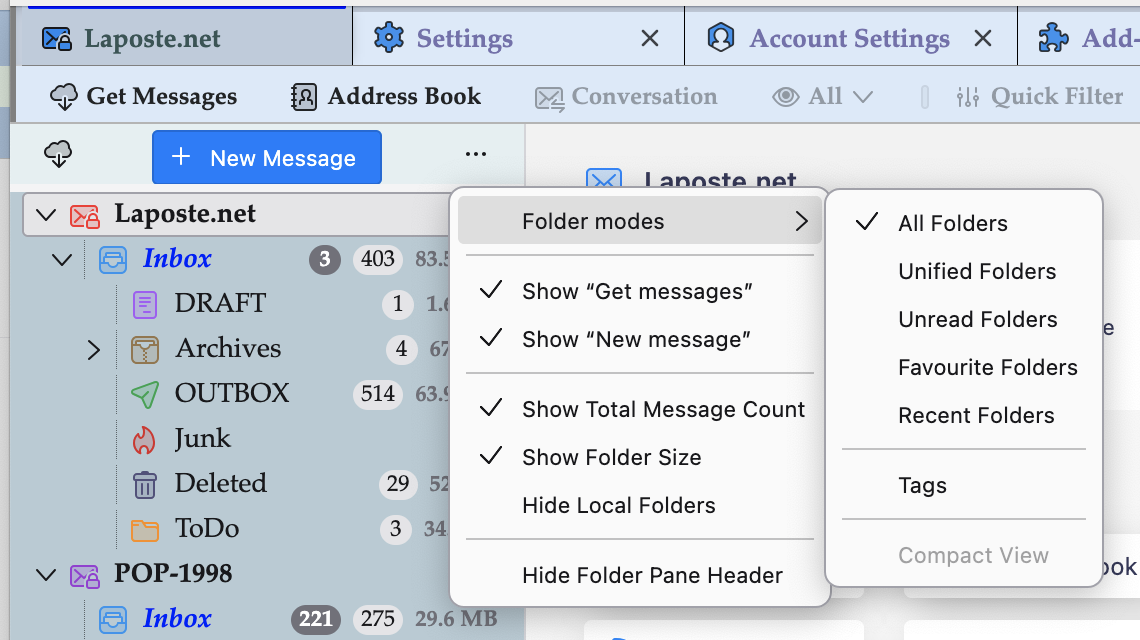
You no longer need the Folder Pane View Switcher add-on. This functionality is incorporated in modern Thunderbird versions (image). If you can't find your usual display via folder modes start Thunderbird in "troubleshoot mode" and see whether the displays suits you. https://support.mozilla.org/en-US/kb/troubleshoot-mode-thunderbird
Read this answer in context 👍 1All Replies (2)

Chosen Solution
Craig100 said
I have the Folder Page View Switcher in, that was working after the upgrade but I innocently changed a setting on it, and it disappeared. I cannot find anything to bring it back.
You no longer need the Folder Pane View Switcher add-on. This functionality is incorporated in modern Thunderbird versions (image). If you can't find your usual display via folder modes start Thunderbird in "troubleshoot mode" and see whether the displays suits you. https://support.mozilla.org/en-US/kb/troubleshoot-mode-thunderbird
Thanks. I removed the folder switcher. I don't use it anyway. I think you'd call the view I normally use "Favourite Folders" where I see my main inbox with favourites underneath, but can still see "All Folders" under that. It all went crazy when TB updated causing a bit of a panic. All good now. Thanks for your response :)