


Can't send emails from TB after Spectrum forced a password change

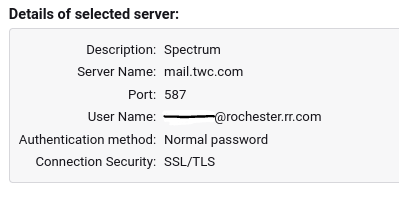
Spectrum forced a password change and now I can receive but not send emails from TB. I have spoken with Spectrum support, been through everything suggested on both the Spectrum and TB forums --multiple times-- including deleting and recreating the account, editing the password, checking for typos, blank spaces, changing the TLS security minimum, running in troubleshooting mode, etc etc. and nothing has worked. I have TB 140.4.0esr on a Chromebook with ChromeOS 141.0.7390.135 and Debian GNU/Linux 12, no separate antivirus program or firewall but do have Malwarebytes. The only recent update was to ChromeOS but that was weeks before the problem developed. I have two other (non-Spectrum) accounts set up on TB and they work fine. I can send emails from Spectrum's website but this is not a permanent solution. These settings match those provided by Spectrum, although they only show SSL, not SSL/TLS.
Chosen Solution
The first combination worked. Thanks so much!
All Replies (4)
FWIW https://support.mozilla.org/en-US/questions/1546513 posted the same issue

Hello Wayne,
The info you added does not help my settings at all. I did what this person wrote in the link I am adding here: <<<< ThundaMike Mozilla Staff 7/28/25, 9:15 PM more options Sounds like you are almost there.
Building off what @david said above, try this:
In Thunderbird, go to Settings > Privacy & Security.
Scroll down to the Passwords section and click Saved Passwords….
Find your email account in the list and remove the saved password.
Restart Thunderbird.
When prompted, enter your new password. >>>
My doing this it removed the .twc log in totally in the Settings. I do not see the "my email address @twc.com in the list, I only see the Hotmail account settings I have in Thunderbird. Removing it like ThundaMike wrote really removed all the twc password and info so I can receive my daily emails in Mozilla Thunderbird.
Is there a way I can bring back my thunderbird like it worked before Spectrum's Notice that I had to change password before November 11? I have tried creating several new passwords, even the password I had changed in Spectrum . net. Something is not working right and I do not know how to fix it myself, I need your help.
Thank you for your time and efforts.
re :but not send emails from TB.
Try the following: SMTP
- Server Settings: mail.twc.com
- Port: 587
- Username = full email address
- Authentication Method: Normal Password
- Connection Security: STARTTLS
OR
- Server Settings: mail.twc.com
- Port: 465
- Username = full email address
- Authentication Method: Normal Password
- Connection Security: SSL/TLS
Chosen Solution
The first combination worked. Thanks so much!