To always show the Menu bar:
- Right-click an empty area of the Tab bar at the top of the Firefox window and click Menu Bar.
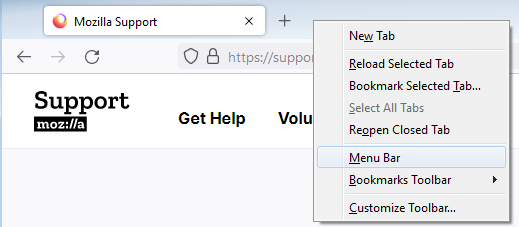
Alternatively:
- Click the menu button
 , click More Tools… and choose Customize Toolbar…
- A new Customize Firefox tab will open.
- Click Toolbars at the bottom of the window and click Menu Bar.

- Click Done to save your changes.
To always show the Menu bar:
*Right-click an empty area of the Tab bar at the top of the Firefox window and click '''Menu Bar'''.
:[[Image:Fx105RightClickTabBar-win]]
Alternatively:
#Click the menu button [[Image:Fx89menuButton]], click '''More Tools…''' and choose '''Customize Toolbar…'''
#*A new ''Customize Firefox'' tab will open.
#Click ''Toolbars'' at the bottom of the window and click '''Menu Bar'''.
#;[[Image:menu bar customize 57]]
#Click ''Done'' to save your changes.



