Feature request for spam filters

Currently, when setting up spam filters, Thunderbird allows one to to set a condition. Would it not be possible to add an AND field to that. For example, I often get spam emails of the form "BankName interest rate changes". While I can set a filter to ignore any Subject that contains the work BankName it does not help if BankName is my actual bank. It would be useful to be able to create a filter such as: Send to junk if subject contains BankName AND email does not contain BankName.com.
Just a suggestion.
Many thanks -Ian
Chosen solution
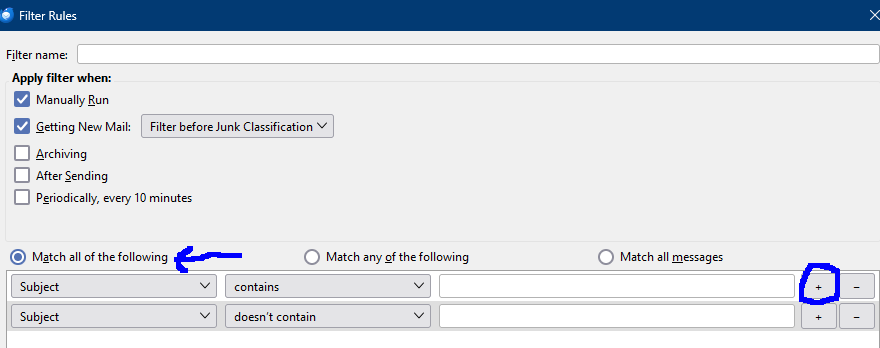
There's the "Match all of the following" criteria option. That is effectively an AND condition. So, you'd have:
Match all of the following: SUBJECT contains BankName FROM doesn't contain BankName.com
If you examine the headers of a legit bank email, you might find some other criteria that would definitively distinguish their messages from imposters.
Read this answer in context 👍 0All Replies (7)

Chosen Solution
There's the "Match all of the following" criteria option. That is effectively an AND condition. So, you'd have:
Match all of the following: SUBJECT contains BankName FROM doesn't contain BankName.com
If you examine the headers of a legit bank email, you might find some other criteria that would definitively distinguish their messages from imposters.
It is an AND statement, If the sender is bankname and sender is not bankname.com. tick the box to match all conditions
I posted this earlier, but apparently it's waiting for "moderator's approval"! I'll try again...
Choose the "Match all of the following" option. Criteria are:
Subject CONTAINS BankName From DOESN'T CONTAIN BankName.com
Perform these actions:
Set Junk Status to Junk
If you examine a legit bank message header, you might find some other criteria that definitively identifies your banks mails.
If you know about regular expressions, there's an add-on called "FiltaQuilla" that allows you to use them to make more complex filter rules.
Modified by Lin
Add extra conditions to the same filter as in the attached picture. 'Match all...' means AND, 'Match any...' means OR.