


Unable to send email

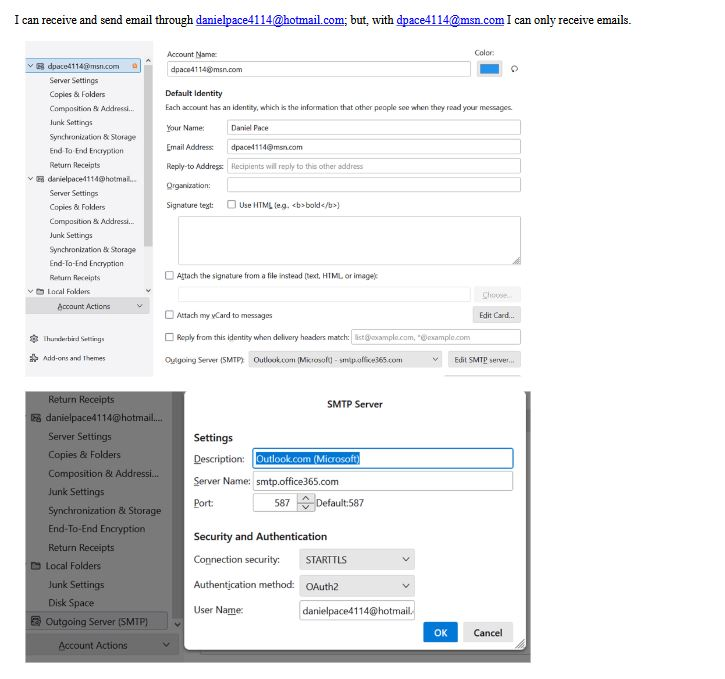
I have two email accounts in Thunderbird 128.7.0esr. I am using a Windows 10 operating system. I can receive and send email through [email removed]@hotmail.com; but, with [email removed]@msn.com I can only receive emails. I have attached screen shots of account settings. Please help in very simple terms. I am an old guy! Thank you, Dan
Modified by NoahSUMO
All Replies (3)
The email address in incoming pane is not the same as in smtp server pane. the incoming is dpace4114@ and the smtp is danielpace4114@ Fix that and try again.
My guess is that you are using the same SMTP server for both. To verify, edit the SMTP server for each by changing DESCRIPTION field to contain the email address. Then, click the account settings>server settings pane for each and look at bottom line to see the email address shown in the link to SMTP server.
Sorry David. Your "guess" was correct because that is all I can do in Thunderbird. I tried your fix and I still cannot send from my msn account. By the way, this may be a coincidence but a few hours after I sent the request for help and received a response, I received an ugly spam mail to my hotmail. I do not get many much spam, perhaps one every other day. Thanks for trying to help me. Dan