Windows 10 reached EOS (end of support) on October 14, 2025. For more information, see this article.

Search Support

Avoid support scams. We will never ask you to call or text a phone number or share personal information. Please report suspicious activity using the “Report Abuse” option.

Learn More

can't connect a google mail (gmail) account to Thunderbird?

  • 3 replies
  • 0 have this problem
  • 14 views
  • Last reply by christ1

more options
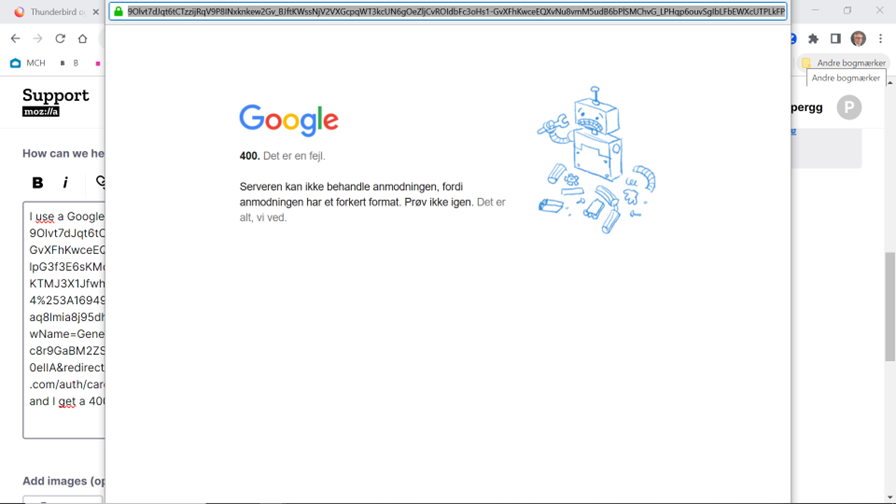
I use a Google app-access code and in step 2 it sends this URL: https://accounts.google.com/v3/signin/identifier?app_domain=http://localhost&client_id=406964657835-aq8lmia8j95dhl1a2bvharmfk3t1hgqj.apps.googleusercontent.com&continue=https://accounts.google.com/signin/oauth/legacy/consent?authuser%3Dunknown%26part%3DAJi8hAOVxJ35FoC9hsaurzPPJ84AWQ2yOsL26_H8knJpVshnhilfpdG0ut0r8yBxE1-KoOV4qch6EVht_g7BviyXoePe3dQfuJhG3-RPfz_Peo9YG1sZl5aT1r6VjHXdKWymAzR2rp5XyWyyA49Olvt7dJqt6tCTzzijRqV9P8INxknkew2Gv_BJftKWssNjV2VXGcpqWT3kcUN6gOeZljCvROIdbFc3oHs1-GvXFhKwceEQXvNu8vmM5udB6bPlSMChvG_LPHqp6ouvSgIbLFbEWXcUTPLkFPSyNEdniEpz5zXsr1zzbGdSTuvqq0lpG3f3E6sKMdvOiJ_D5kpTterFCf7H8msBf5bL_Xg2Nwea11n2YQO4RRtgMaLLQMcoN9ef0LnWlzc59Dl6BlG4SI5mg8KTMJ3X1JfwhQsUf8cjUducjE3osQBs7Gg_RcImDNZzRmyhAmMEY6IlI0VssFqXaWVJL0a90Q%26as%3DS1342905714%253A1694950896818542%26client_id%3D406964657835-aq8lmia8j95dhl1a2bvharmfk3t1hgqj.apps.googleusercontent.com%23&dsh=S1342905714:1694950896818542&flowName=GeneralOAuthLite&login_hint=pggotfredsen@gmail.com&o2v=1&opparams=%253F&rart=ANgoxcc6baqkyc8r9GaBM2ZSFJqIrSdQsHQKv4-IlFnWRvikFydiupiwNjA_xVEv79G40DSGsrIv4lRw7H37cnIUZz6b-0eIIA&redirect_uri=http://localhost&response_type=code&scope=https://mail.google.com/+https://www.googleapis.com/auth/carddav+https://www.googleapis.com/auth/calendar&service=lso and I get a 400 error - see attached
Attached screenshots

All Replies (3)

more options

What are you trying to achieve in the first place? Note, Thunderbird supports CardDAV natively, and it uses OAuth2 authentication. You'll have to use your main Google account password for this, no app password is needed.

more options

I have downloaded Thunderbird and try to get use of my different mail-accounts, and Gmail gives me problems.

I have followed the instructions from Mozilla: "As of May 30, 2022, Google will no longer support access for less secure apps to Gmail accounts, so OAuth is required. If you use Google-supplied "app passwords", Thunderbird version 91.8.0 and later versions will do the conversion to OAuth for you. Additionally, Gmail accounts do not work with Thunderbird version 31 and earlier because they do not support Google's OAuth (implemented in bug 849540)."

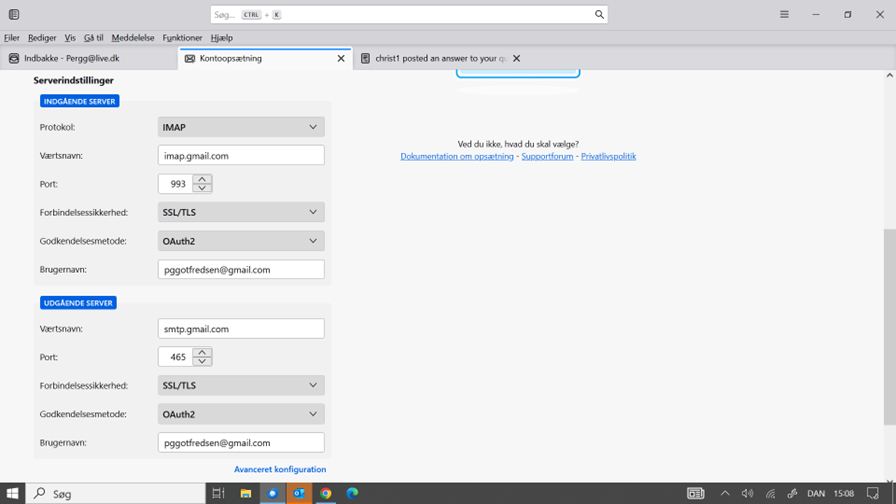
And I can se that Thunderbird try to connect with OAuth2 - see attached

I have tryed the Google generated password as well as my normal - same result!
more options

Your screenshot isn't showing the Thunderbird server settings. Please post your Troubleshooting Information. At the top right of the Thunderbird window, click the menu button ≡, then select Help > More Troubleshooting Information. Press the "Copy text to clipboard button" and paste the information into your reply.