

This thread was archived.
Please ask a new question if you need help.

Archived
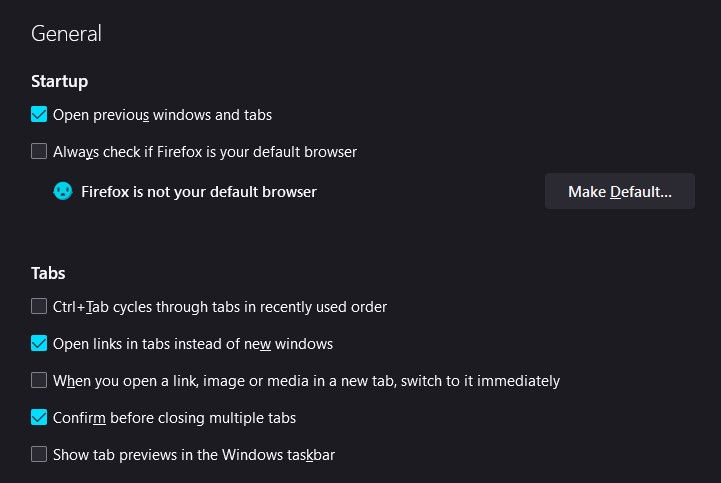
Open previous windows and tabs not working

Whenever I close my app, it doesn't restore my tabs. Since I checked "Confirm before closing multiple tabs", any attempt to close Firefox will warn me. It should not be doing this. I have been using Firefox for almost a decade now, and it started acting differently all of a sudden (most likely after an update).
Whenever I close my app, it doesn't restore my tabs. Since I checked "Confirm before closing multiple tabs", any attempt to close Firefox will warn me. It should not be doing this. I have been using Firefox for almost a decade now, and it started acting differently all of a sudden (most likely after an update).
All Replies (1)
In case you use "Clear history when Firefox closes" or otherwise clear history.
- do not clear the "Browsing history"
- Settings -> Privacy & Security
Firefox will: "Use custom settings for history":
[X] "Clear history when Firefox closes" -> Settings - https://support.mozilla.org/en-US/kb/delete-browsing-search-download-history-firefox
- using "Clear history when Firefox closes" in Firefox 102+ honors exceptions and keeps cookies with an allow exception, previous versions removed all cookies
- clearing "Site settings" clears exceptions for cookies, images, pop-up windows, and software installation and exceptions for passwords and other website specific data