


how do i get rid of seeing the little yellow triangles
why am i seeing these little yellowish loing like triangles or diamonds to the left of message? and how do i stop them

All Replies (12)
Please review this URL, as I think this is addressing your intent: https://support.mozilla.org/en-US/questions/1273397
no but thanks agar i will send what i mean there is like a diamond yellow diamond on the left of every new message I tried everything to get rid of it see image

From my own testing, that URL seems correct. The only places I see that symbol is for messages where I have remote content disabled. That is what the symbol is there for.
howq do i enable remote content
Tools>Settings>Privacy&Security is a tickbox to allow all. However, spammers use that feature to track if recipient clicks on the email. A safer approach is to review incoming emails. There is a yellow bar above message indicating that remote content was blocked to protect privacy, with an options button. If the message is from a known company, you can click the option button and select to allow from that email address. Then, in future, all messages from that company will show graphics and no yellow symbol shown.
ihave it enabled
see photo
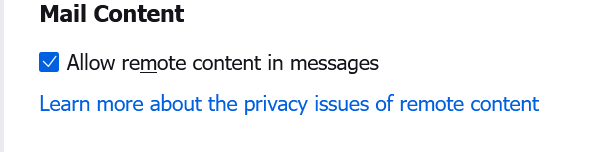
That should eliminate those yellow symbols.
but it is not
Are you saying that it still shows for new incoming messages? Or are you saying that the yellow image still shows for messages already received?
every time i receive a new message i get that little yellow
tringly thing for every new message
All I can suggest then is to check the Exceptions button next to the remote message setting to see if addresses are blocked.