


Address Bar Settings

Hey, so i've been editing my address bar settings in firefox to customize it.
However one thing i can't quite work out is when you go into privacy & security and scroll down to the following
Address Bar
- When using the address bar, suggest
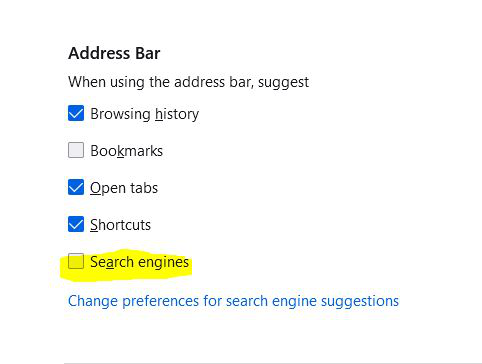
(Search Engines) - When this is unticked what exactly does it do? - As it doesn't seem to change anything.
Any insight would be appreciated.
Chosen solution
Let's say the preference is checked (enabled). When you start typing bing in the address bar, Firefox will display a giant suggestion asking if you want to search with Bing. Similarly with duck and DuckDuckGo. When you uncheck the box, Firefox doesn't do that and simply lets you discover the available search engines yourself.
(I'm not sure if this checkbox controls anything else; that's what I noticed.)
Read this answer in context 👍 1All Replies (2)
This is the setting i'm reffering to, - does anybody know what it actually does?
I assumed it was the google search suggestions, - but it didn't remove them.
Chosen Solution
Let's say the preference is checked (enabled). When you start typing bing in the address bar, Firefox will display a giant suggestion asking if you want to search with Bing. Similarly with duck and DuckDuckGo. When you uncheck the box, Firefox doesn't do that and simply lets you discover the available search engines yourself.
(I'm not sure if this checkbox controls anything else; that's what I noticed.)