


Please add a "pin this tab" option to the context menu for tabs.

Hi!
I'd like to be able to pin individual tabs so they stay in place. Same as the "Pin Tab" function in Firefox.
Thanks!
All Replies (3)
Does the folder pane toolbar address that for you? View>toolbars>folder pane toolbar. It shows selected messages in tabs
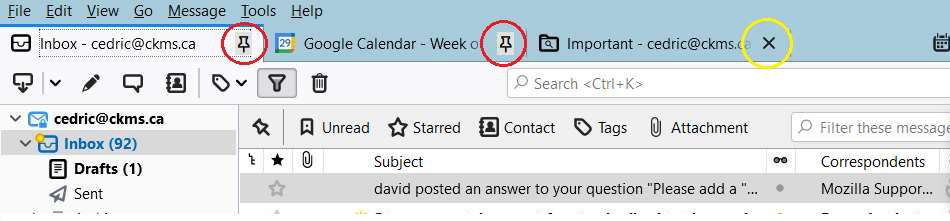
Nope. See the attached; I want to keep the "Inbox" and "Google Calendar" (circled in red) tabs pinned. The "Important" tab is not pinned.
My problem is I sometimes start looking at the "Important" tab, then want to look at my Inbox. But instead of clicking on the "Inbox" tab I press the "Inbox" in the folder tree; this replaces the "Important" tab with the "Inbox", sop now I now have 2 "Inbox" tabs, which is pointless. See 2nd attachment.
I realize it is I making the error. But adding a "pin tab" seems trivial and would help.
Thanks!

If it's a suggestion you wish to make, you can do that at https://bugzilla.mozilla.org/home