


Display problems in Thunderbird (win10)
Hi,
Since the last few updates of Thunderbird (not sure which version), I've had a display problem appear where mail folders and messages don't appear until I drag the mouse cursor over them, then they do (see image attached). Everything else works as expected.
I tried running in Safe mode, problem disappears.
I tried running in Safe mode, disabling addons and reseting toolbars, doesn't solve the problem.
I've tried updating my display drivers, no change.
Any ideas?
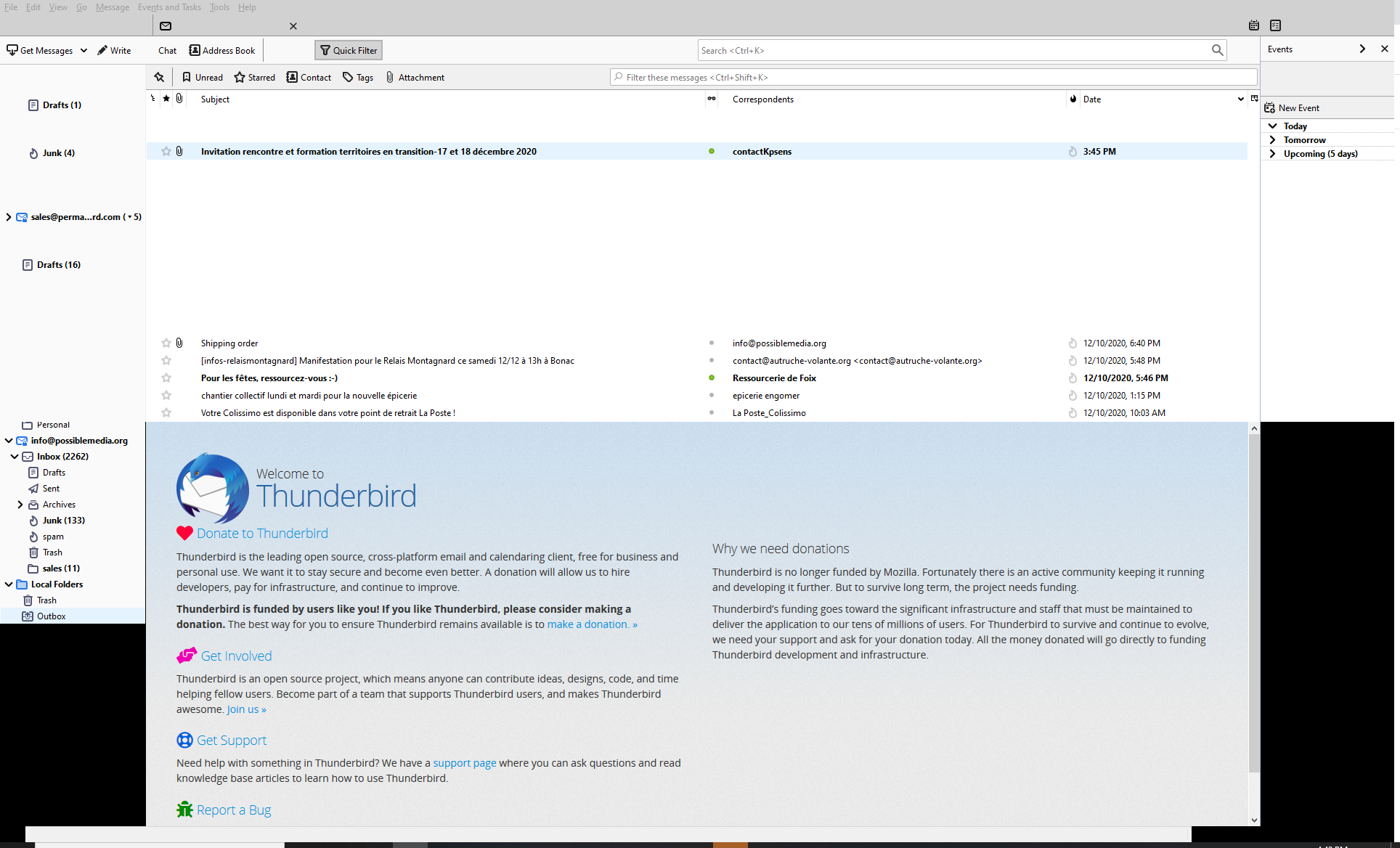
Modified by Wayne Mery
Chosen solution
Try disabling hardware acceleration in Options/General/Indexing, restart TB. It's disabled in safe mode.
https://support.mozilla.org/en-US/questions/1312645
Read this answer in context 👍 2All Replies (3)
I'm using Thunderbird 78.5.1 (32-bit) on Windows 10.
Chosen Solution
Try disabling hardware acceleration in Options/General/Indexing, restart TB. It's disabled in safe mode.
That did it, thanks!