


Cannot create Calendar in Thunderbird no matter what help/process I use.
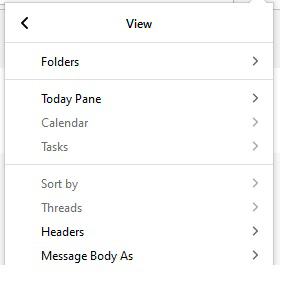
I've tried everything and all help to create a Calendar in Thunderbird v78.3.3 on Windows 10. After doing the following: New Calendar On My Computer Gave it a name. It said "Your calendar has been created.". Pressed "3 underlines" (Thunderbird Menu), View, Calendar is GREYED out and cannot be selected. See attached.
I've tried and tried, 10's of on-line suggestions, and NOTHING works. Sincerely Greg
Chosen solution
Try Ctrl+Shift+C (Events & Tasks/Calendar) or click the calendar icon just below the min., max. and exit buttons at the upper right corner. Calendar is also under Events & Tasks on the AppMenu.
Read this answer in context 👍 0All Replies (1)
Chosen Solution
Try Ctrl+Shift+C (Events & Tasks/Calendar) or click the calendar icon just below the min., max. and exit buttons at the upper right corner. Calendar is also under Events & Tasks on the AppMenu.