


junk folder
I am using version 68.11.0 32 bit. I migrated my email and folders from another computer. I have discovered that I don't have a junk folder and I would like to know if it is possible to restore it somehow.
Chosen solution
I had a thought....In the 'profile folders' ...Do you have the file extensions showing? In the window toolbar, select the 'View' tab and make sure the 'File names extension' checkbox is selected.
Or make sure all file extensions are shown. File > Options to open the 'Folder Options' window select 'View' tab scroll down Uncheck the checkbox so it is not selected for : 'Hide extensions for known file types' click on 'Apply' and click on 'OK'
Read this answer in context 👍 0All Replies (5)
Exit Thunderbird and access profile. If the pop mail account folder in the profile folders: Has no 'Junk' mbox file nor a 'Junk.msf' file, right click in the folder and select 'New' > 'Text document' Name the text document Junk and remove the .txt extension. It will tell you a warning but accept it. This creates the mbox file.
Has a 'Junk' mbox file and a 'Junk.msf' file, then delete the 'Junk.msf' file. Has only a 'Junk.msf' file then delete it and create the mbox file by doing this: right click in the folder and select 'New' > 'Text document' Name the text document Junk and remove the .txt extension. It will tell you a warning but accept it.
Start Thunderbird.
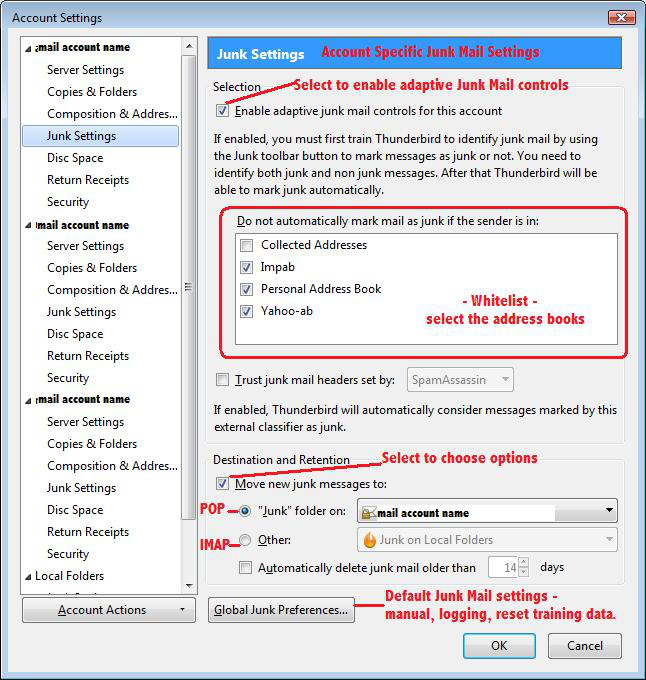
Now check your Junk Settings for the account and make sure they are enabled and set up correctly. Example image below.
Then train the Junk Settings by marking a junk email as Junk. If you get emails that are marked as junk but they are not, then mark as not junk.
Info on Junk controls:
Thanks Toad-Hall I went to my profile and no there was no file for junk. I did as you suggested, I opened a new text document and named it junk.
I have tried everything I can think of to change the file extension and win 10 is fighting me on it and I have not been able to remove the txt file extension.
You must make sure Thunderbird is not running whilst you are doing this in the profile folders. This cannot be done in Thunderbird - only in the profile folders. When you are doing a right click on 'Junk.txt' file and select 'rename' to turn Junk.txt into just Junk, Windows does do a pop up that says 'If you change a filename, the file might become unusable. Are you sure you want to change it? ' The answer is 'Yes'.
Modified by Toad-Hall
Chosen Solution
I had a thought....In the 'profile folders' ...Do you have the file extensions showing? In the window toolbar, select the 'View' tab and make sure the 'File names extension' checkbox is selected.
Or make sure all file extensions are shown. File > Options to open the 'Folder Options' window select 'View' tab scroll down Uncheck the checkbox so it is not selected for : 'Hide extensions for known file types' click on 'Apply' and click on 'OK'
Thanks Todd you last post was the fix. This will help me in the future I am sure.
After I read your first post this morning I went back and tried to do what you wrote again. This time I noticed that inbox had both TXT and MSF files so I copied both files and then renamed them That also works.
Again thanks for helping me get my junk folder back.