


Message / Display the Thunderbird menus and toolbar
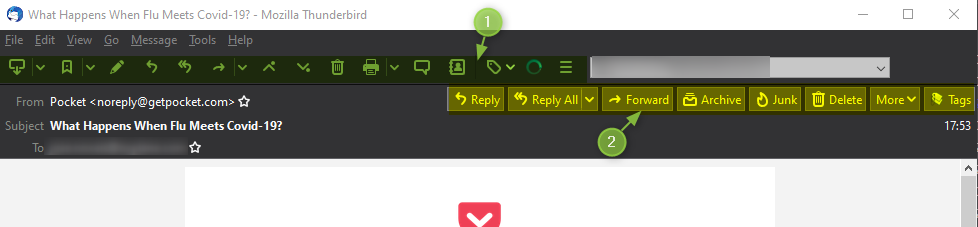
Hi, I just installed Thunderbird 78.1.0 By mistake I deselected the menu (1), impossible to put it back, how do I proceed? Then, how can I remove the choices (2) in the head of the message? Thank you for your help. Regards
Hi,
I just installed Thunderbird 78.1.0
By mistake I deselected the menu (1), impossible to put it back, how do I proceed?
Then, how can I remove the choices (2) in the head of the message?
Thank you for your help.
Regards
All Replies (1)
re: By mistake I deselected the menu (1), Using the top 'Menu Toolbar' 'View' > 'Toolbars' > select 'Mail Toolbar'
re: Then, how can I remove the choices (2) in the head of the message? Currently this is not active. There is a bug report requesting activation. https://bugzilla.mozilla.org/show_bug.cgi?id=1556261