


Message Filters option missing from hamburger menu
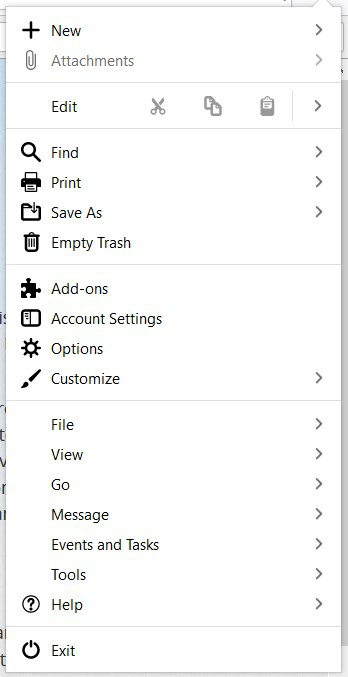
I am missing the Message Filters menu selection as described in https://support.mozilla.org/en-US/kb/organize-your-messages-using-filters. Attached is an image of the menu. I am using Thunderbird 78.5.0. How do I get it back?
I am missing the Message Filters menu selection as described in https://support.mozilla.org/en-US/kb/organize-your-messages-using-filters. Attached is an image of the menu. I am using Thunderbird 78.5.0. How do I get it back?
Solusi terpilih
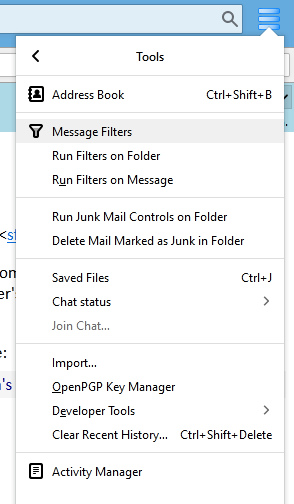
It's under Tools (see picture).
Baca jawaban ini dalam konteks 👍 1Semua Balasan (3)
Solusi Terpilih
It's under Tools (see picture).

Why are you making filters harder to access? I would like them easier to access! I would like a short cut on the toolbar!
reg2 said
Why are you making filters harder to access? I would like them easier to access! I would like a short cut on the toolbar!
https://addons.thunderbird.net/en-US/thunderbird/addon/filter-on-folder-button/