


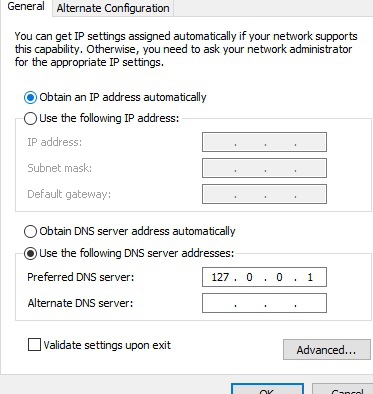
Firefox is setting a DNS override in all machines to 127.0.0.1 I can't find a way to stop this. It is over riding DNS software I want to use. This seems new.
Firefox is setting a fixed DNS override in all machines to 127.0.0.1 I can't find a way to stop this. It is over riding DNS software I want to use.
One AV program recognizes this (probably incorrectly) as a DNS:highjack and it I remove it it resets Firefox to a blank slate and I start over w/ re-syncing and reloading favorites etc and the DNS setting is put back in place.
I want my DNS settings to stay at automatic.
All Replies (1)

Hi newportironman, I think this might have something to do with the DoH Rollout. There was supposed to be a notice when this was activated but, I didn't get one - probably because I use DoH anyway.
So, you will need to go to: Menu -> Options -> General page scroll all the way down to Network Settings select Settings scroll down to the bottom of the settings window and de-select *Enable DNS over HTTPS
If it turns back on, there is a way to force it to stay off in the Advanced Preferences (about:config).
See this article: DNS-over-HTTPS (DoH) FAQs